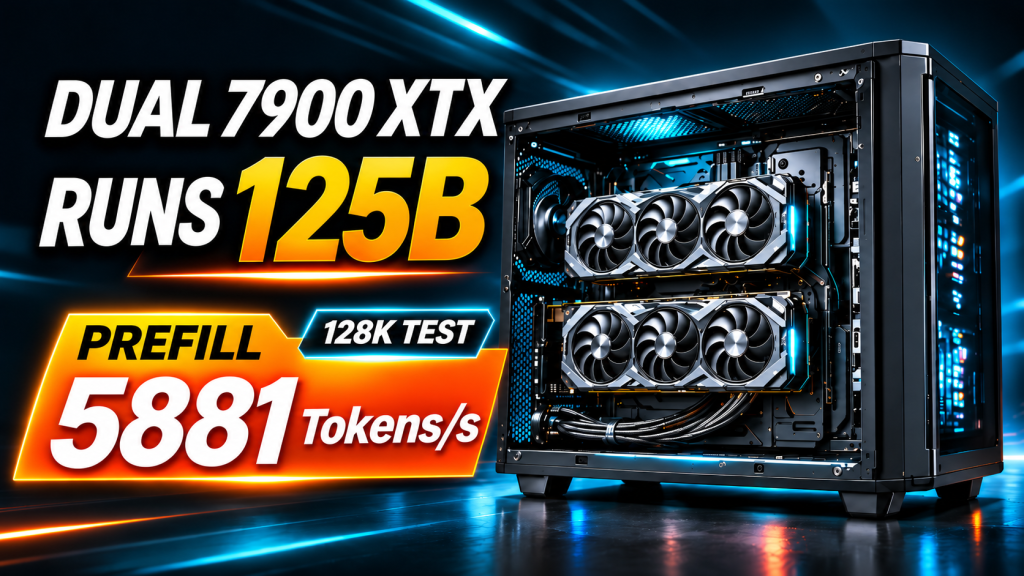
Dual RX 7900 XTX Deployment Guide: Run a 125B MoE Model with 256K Context at 5,748 tok/s
Test rig: AMD Ryzen 7 3700X · 2 × RX 7900 XTX 24GB (PCIe 4.0 x8 + x8, measured) · 94 GB DDR4 · Ubuntu 24.04.4 · ROCm 7.2.4
Engine: Strata RDNA3 fork (commite1dad2dc) — tensor-parallel decode, dual-path prefill
Model: Qwen3.8-Flash-Next 125B MoE · Swift IQ3_S (46.8 GB) / Unsloth UD-IQ4_XS (56 GB)What this is: a complete deployment walkthrough, from a fresh Ubuntu install to a serving endpoint. Every command and config below comes from the real machine — copy them and you should land in the same place.
Who it is for: developers and builders who want a 125B-class model running privately on consumer hardware with long-context agent workloads.
Time: 2–4 hours, most of it model download (engine build is ~15 min).
Prerequisites: comfort with a terminal and a fresh Ubuntu install. That is all.
What you get when you are done
Two consumer cards, no NVLink, no datacenter parts — and the same 125B model running jointly across both. Here is what our reference machine measured after following this guide exactly (3-run median, temp=0):
| Metric | Single GPU | Dual GPU (this guide) | Speedup |
|---|---|---|---|
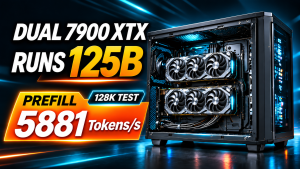
| 128K prefill | 3,148.4 tok/s | 5,748.5 tok/s | 1.83x |
| 128K TTFT | 41.752 s | 22.917 s | 1.82x |
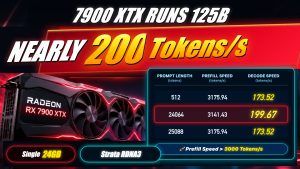
| 32K decode | 88.6 tok/s | 133.7 tok/s | 1.51x |
| 256K (261,632 tok) prefill | — * | 5,766.9 tok/s | — |
*Single-GPU 256K was not part of this test matrix. You can add it with the protocol in Step 6.
Also: 3/3 needle-in-a-haystack keys recalled at 256K, zero OOM, zero crashes across every round, and a 210.35 tok/s single-request peak in a long-output sweep (speculative-decoding friendly workload, not steady state).
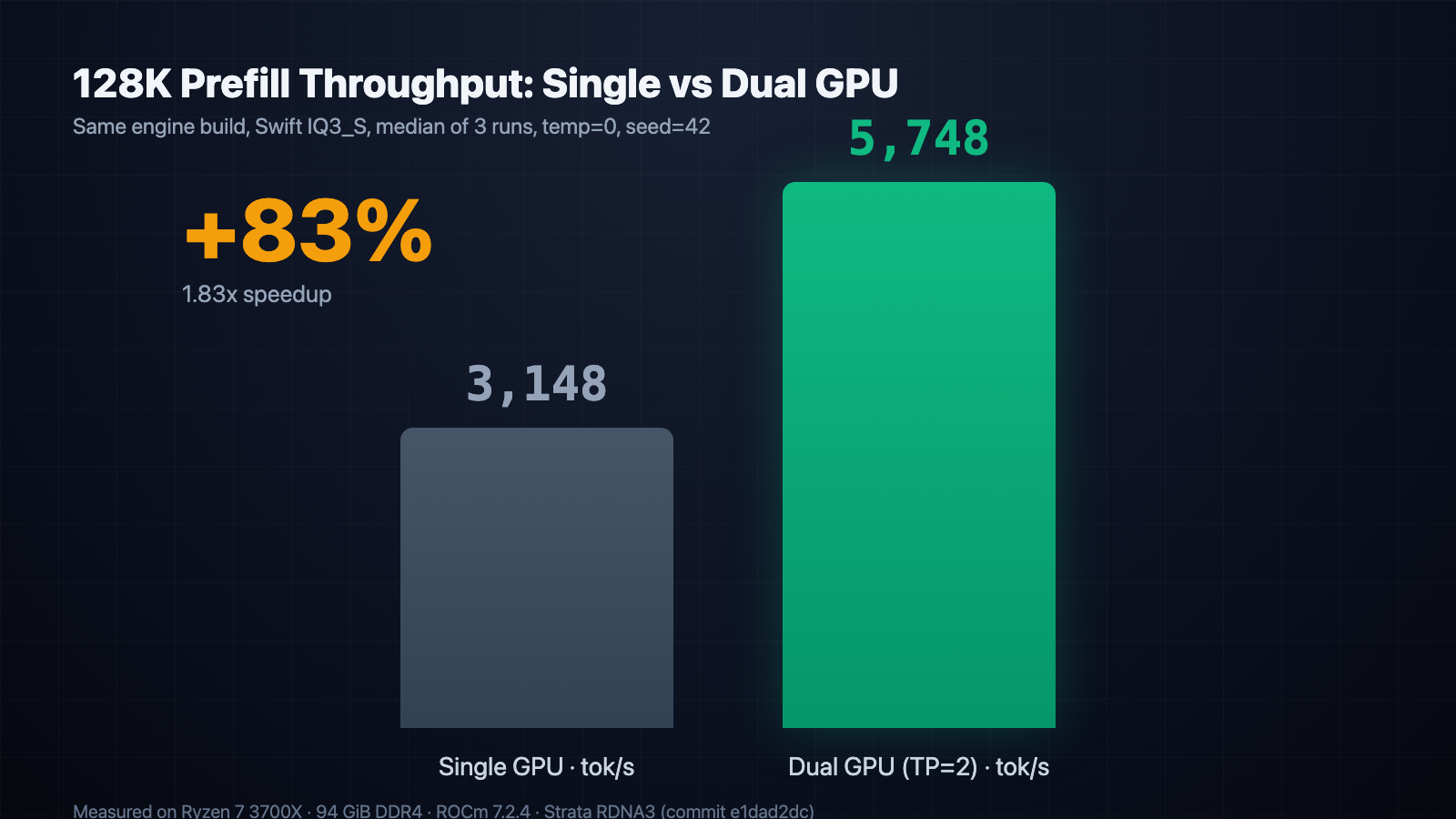
Figure 1 — 128K prefill throughput, same engine build. Dual-card tensor parallelism adds 83%.
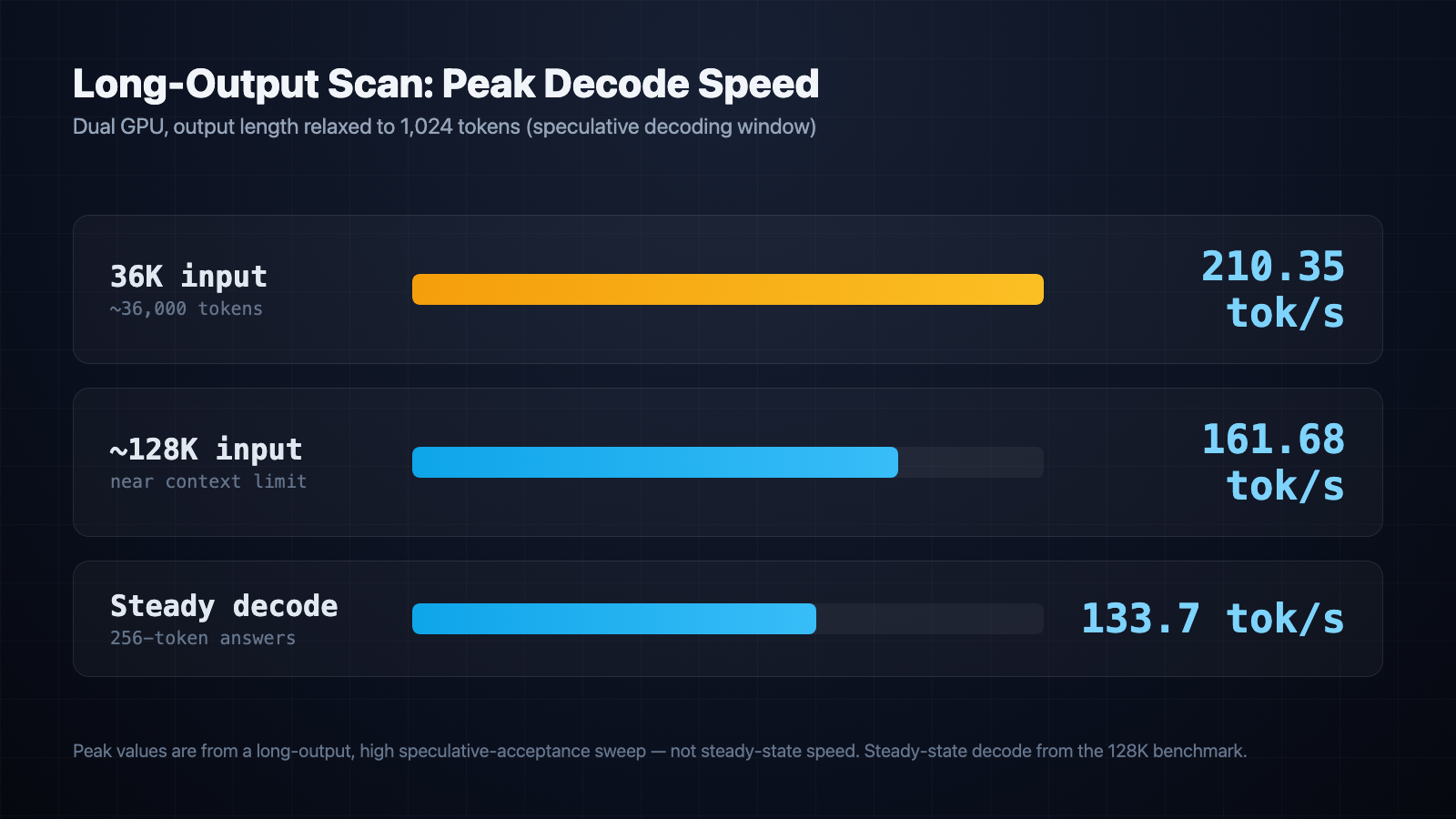
Figure 2 — long-output sweep. Peaks come from high speculative-acceptance windows; steady-state decode is the 133.7 tok/s in the table above.
Six steps and a list of pitfalls follow.
Step 1 — Hardware: know the parts list before you spend
For dual-GPU inference the bottleneck is not the CPU. It is bus topology, VRAM, system RAM, and power/thermal headroom.
| Part | Recommendation | What to watch out for |
|---|---|---|
| GPUs | 2 × RX 7900 XTX 24GB (gfx1100) | 24 GB + 384-bit bus each; together they form a 48 GB pool |
| Motherboard | Any board that can do x8+x8 split (X570 / B650 / X670E) | The number one failure mode: never put the second card on a chipset (PCH) x4 slot. Cross-card traffic collapses to a quarter of the bandwidth. Both cards must hang off CPU lanes. x8+x8 is enough — that is what our rig actually ran — x4 is what kills it |
| CPU | Ryzen 7 3700X / 5700X / 7700X class | No multi-socket Xeon needed: with ~98% expert-cache hit rate, an AVX2-only 3700X still hits 5,700+ tok/s |
| RAM | ≥ 96 GB (64 GB is the floor) | IQ3 peaks at 73.91 GB, IQ4 at 83.16 GB — 9 GB is the difference between “comfortable” and “OOM edge” |
| PSU | 1000–1200 W, 80 PLUS Gold or better | Two cards at 303 W each under load. Every 8-pin must be its own cable — no daisy-chained splitters |
| Cooling | Case that fits two 3-slot cards, or an open bench | Stacked cards cook the top one into thermal throttling; leave 1–2 slot gaps or add intake fans |
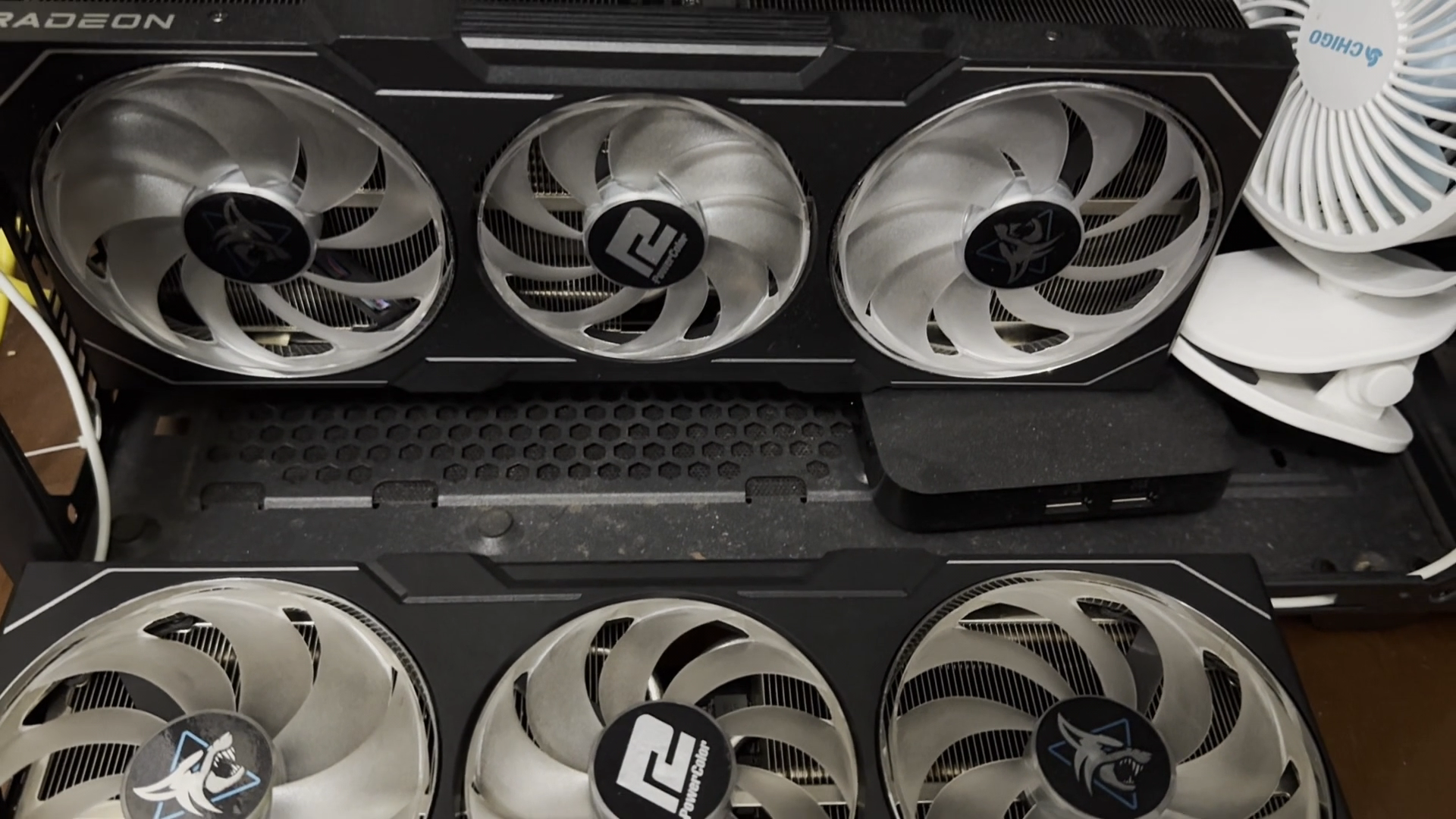
Figure 3 — the reference rig: two RX 7900 XTX cards, each on its own PCIe 4.0 slot, with a cooling gap between them.
Step 2 — OS install and dual-GPU verification
Ubuntu 24.04 LTS is recommended (22.04 works too). The kernel’s amdgpu driver is all you need at the OS level. Verify the cards before you build anything:
# Are both cards visible?
lspci | grep -i vga
# Expect two RX 7900 XTX entries

# Check link speed per card (use your own PCI addresses)
sudo lspci -vv -s 03:00.0 | grep LnkSta
sudo lspci -vv -s 0c:00.0 | grep LnkSta
# Look for: LnkSta: Speed 16GT/s, Width x16 or x8
# x8+x8 is fine (our rig ran GEN 4 @ 8x and still hit 1.83x)
# If you see Width x4 or Speed 8GT/s, fix the BIOS split before going further

# Monitoring tools
sudo apt install -y rocm-smi build-essential git
rocm-smi   # should list GPU0 and GPU1
ROCm note: the engine’s build script installs the ROCm components it needs into a private virtualenv, so you do not have to pre-install ROCm. If your distro requires a system install, use AMD’s official repository for
rocm-hip-sdk rocm-smi hipblaslt, thensudo usermod -a -G render,video $USERand log back in.
Step 3 — Build the Strata RDNA3 engine
Two paths, and they are not equivalent. Upstream Strata (MIT, open source) has a ./setup.sh that supports multiple cards, but its default multi-GPU mode is a pipeline layer split — it will not reproduce the numbers in this article. To replicate them you need the RDNA3-focused fork, which adds tensor-parallel decode and a dual-path prefill pipeline for gfx1100:
mkdir -p ~/AI/strata-rdna3-test && cd ~/AI/strata-rdna3-test

# Clone the fork and check out the exact commit we measured against
git clone --branch rdna3 https://github.com/nicejunjie/Strata-rdna3.git fork
cd fork
git checkout e1dad2dc     # the commit behind every number in this post (AVX2-safe on Zen 2)

# One-shot build: pinned toolchain (ROCm / rocWMMA / llama.cpp) + gfx1100 engine
D="$HOME/AI/strata-rdna3-test/data"
mkdir -p "$D"
./setup.sh --setup --build --backend hip --family qwen --model IQ3_S \
  --vision cpu --data-dir "$D" --no-start --yes

# Verify the artifact: backend must be hip, archs must include gfx1100
cat engine/BUILD.json
The build takes 10–20 minutes and you only run it once. It compiles the engine for your card’s architecture, so a git pull that touches the engine means rebuilding.
Step 4 — Download the model and pack the experts
The trick to running a 125B MoE model at these speeds is not just quantization — it is packing the expert weights into a binary layout the engine can stream efficiently.
Pick one model:
| Model | Packed size | Best for | Peak host RAM |
|---|---|---|---|
ukisai/Swift-1.5-Qwen3.8-Flash-Next-GSQ-RCO-GGUF (IQ3_S) — recommended |
46.8 GB | Chat, fastest generation | 73.91 GB |
Qwen3.8-Flash-Next-UD-IQ4_XS (Unsloth, 3 shards) |
56 GB | Code, math, precision-sensitive work | 83.16 GB |
cd ~/AI/strata-rdna3-test/fork
D="$HOME/AI/strata-rdna3-test/data"

# Download both IQ3_S shards from Hugging Face (or hf-mirror.com for resumable
# downloads inside mainland China) into $D/models/swift-IQ3_S/.
# Both shards are required; download size follows the model card.

# Build the expert pack (~46.8 GB experts.bin)
export STRATA_GGUF_PY="$PWD/third_party/llama.cpp/gguf-py"
.venv/bin/python tools/iq_pack.py \
  --gguf "$D/models/swift-IQ3_S/Swift-Qwen3.8-Flash-Next-GSQ-RCO-IQ3_S-00001-of-00002.gguf" \
  --out "$D/packs/swift-iq3_s" --experts-bin

# Confirm the artifact
ls -lh "$D/packs/swift-iq3_s/experts.bin"
Step 5 — Dual-GPU config and launch
In one sentence, here is what this configuration does: --tensor-parallel 2 splits the weight matrices so both cards compute half of every layer, exchanging partial results over PCIe once per layer. This is not “two models in two windows” — it is one model, two cards, working on the same token stream. Long prompts additionally use data-parallel and tensor-parallel prefill paths; that combination is what lifts 128K prefill from 3,148 to 5,748 tok/s.
Config rdna3/configs/swift-iq3-2gpu.json (key fields annotated):
{
 "exe": "@STRATA@/engine/strata",
 "cwd": "@STRATA@",
 "tokenizer": "@DATA@/packs/swift-iq3_s/tokenizer",
 "model_name": "swift-iq3",
 "backend": "hip",
 "gpu": [0, 1],
 "layer_split": "auto",
 "host": "0.0.0.0",
 "port": 18088,
 "open_browser": false,
 "args": [
  "--pack",           "@DATA@/packs/swift-iq3_s",        // expert pack from Step 4
  "--native",         "@DATA@/models/swift-IQ3_S/Swift-Qwen3.8-Flash-Next-GSQ-RCO-IQ3_S-00001-of-00002.gguf",
  "--tensor-parallel", "2",                              // core: split every layer across both cards
  "--prefill",        "auto",
  "--max-context",    "262144",                          // required for 256K (use 131072 for 128K)
  "--kv",             "int8",                            // 8-bit KV cache: what makes 256K fit in 48 GB
  "--kv-resident",    "32768",                           // first 32K stays in VRAM, rest streams via pinned RAM
  "--expert-cache",   "auto",                            // fills both cards' VRAM (the 48 GB saturation)
  "--vram-reserve-mib", "512",
  "--pool-workers",   "8",                               // match CPU cores (3700X = 8)
  "--mtp-q4",         "all",
  "--spec",           "4",                               // speculative decoding window
  "--spec-min-p",     "0.5"
 ],
 "env": {
  "STRATA_HIPBLASLT_TUNING": "@STRATA@/tools/hip/gfx1100-hipblaslt-100202.txt",
  "STRATA_DP_PREFILL": "1",      // data-parallel prefill: alternate chunks across both cards
  "STRATA_TP_PREFILL": "1",      // tensor-parallel prefill: both cards read every layer
  "STRATA_HIP_WMMA":   "1",      // RDNA3 WMMA matrix-core path
  "STRATA_SELECT_WMMA": "1",
  "STRATA_PEER_TRANSPORT": "host",  // cross-card traffic over mapped host memory (no NVLink needed)
  "GPU_MAX_HW_QUEUES": "8"       // keeps both cards busy; see the fork's RDNA3_SETTINGS.md
 }
}
All three switches matter:
--tensor-parallel 2plusSTRATA_DP_PREFILL=1andSTRATA_TP_PREFILL=1. Turn either prefill path off and 128K prefill falls back toward the single-GPU 3,148 tok/s.
Launch:
cd ~/AI/strata-rdna3-test/fork
D="$HOME/AI/strata-rdna3-test/data"
.venv/bin/python rdna3/run.py swift-iq3-2gpu --data "$D" --gpus 0,1
The engine takes about 48 seconds to load and then serves an OpenAI-compatible API at http://127.0.0.1:18088/v1.
Verify both cards are actually working — this is where most first attempts fail:
# In a second terminal: both cards should show 23 GB+ VRAM and 250-300 W
watch -n 1 rocm-smi

# Smoke test
curl http://127.0.0.1:18088/v1/chat/completions \
  -H "Content-Type: application/json" \
  -d '{"model": "swift-iq3", "messages": [{"role": "user", "content": "Write a parallel prime finder in Python"}], "temperature": 0.6, "max_tokens": 1024}'
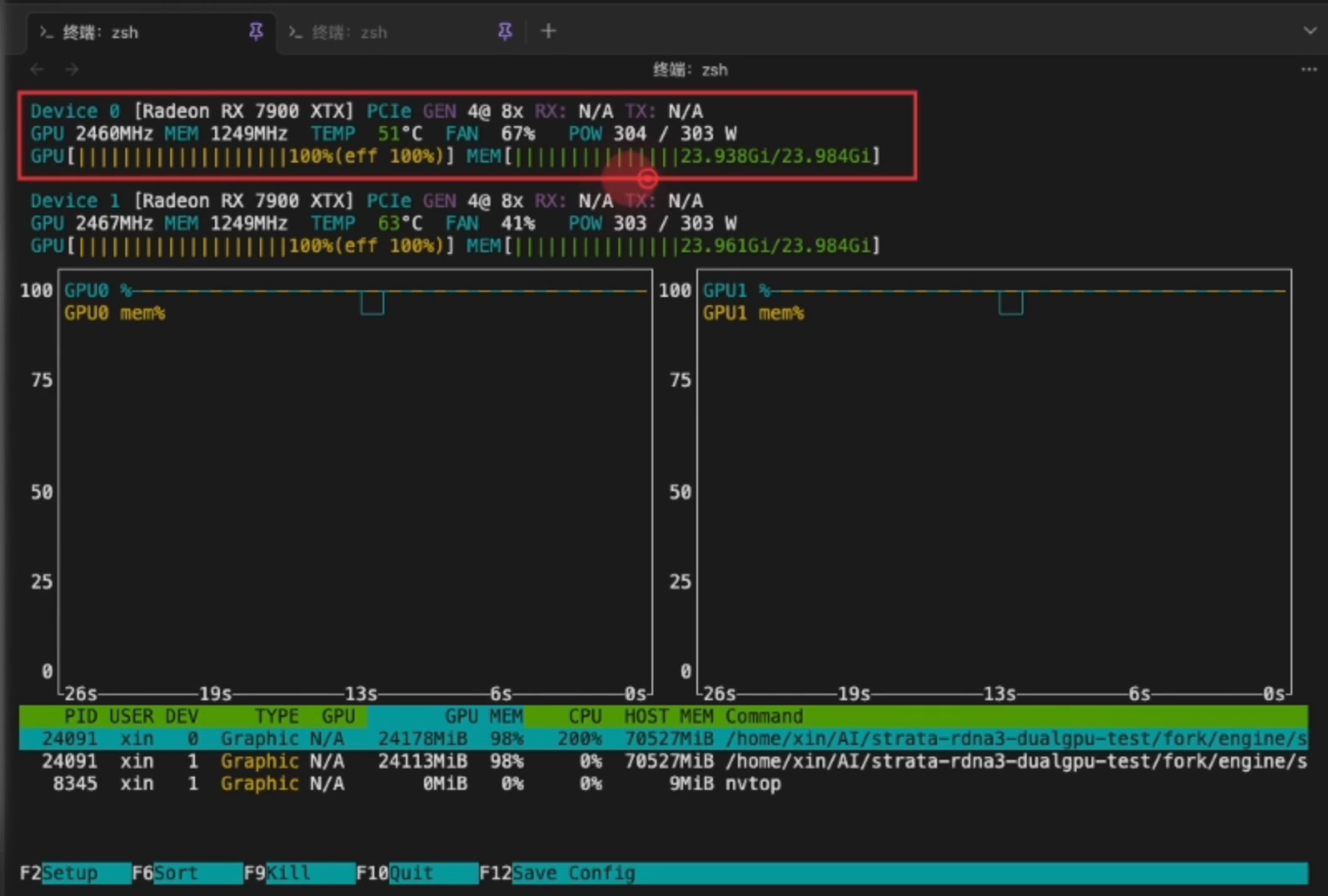
Figure 4 — a correctly deployed pair: 304 W / 303 W, 23.94 + 23.96 GB of VRAM resident, 100% utilization on both cards. If only one card moves, your --gpus or tensor-parallel switch is not taking effect.
Step 6 — Benchmark it and compare
A running server is not a verified deployment. Reproduce the protocol below, then compare:
Protocol (identical to our runs — a different protocol makes the numbers incomparable):
- Per context size: 1 warm-up + 3 formal runs, median reported
temp=0,seed=42, 256 output tokens, prompt cache off- Ladder: 32K → 128K → 256K (261,632 tokens)
./bench.shalso works if you just want a report for your own machine
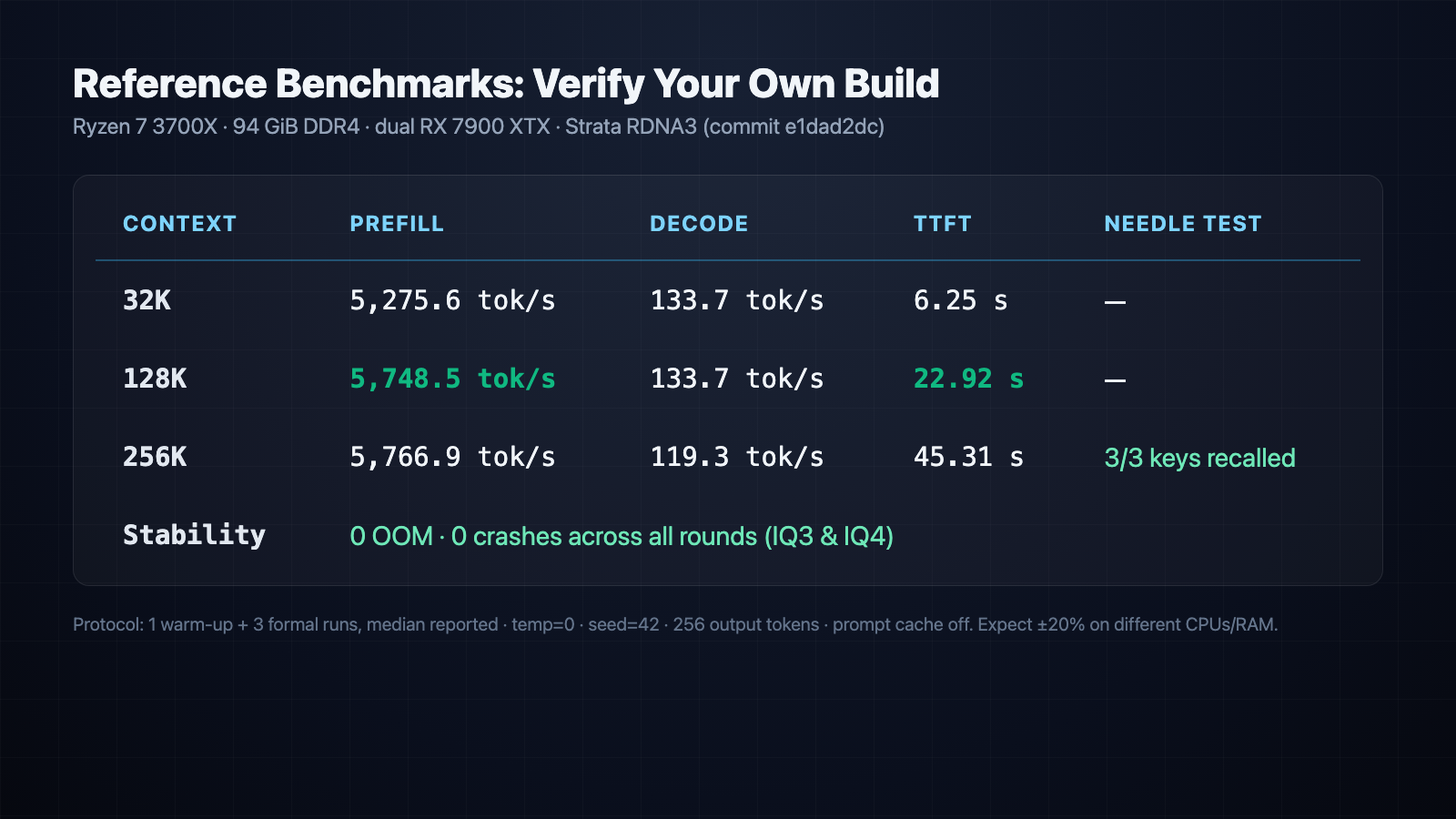
Figure 5 — reference numbers to compare against. Results within ±20% of these figures are normal.
| Context | Prefill | Decode | TTFT | Needle test |
|---|---|---|---|---|
| 32K | 5,275.6 tok/s | 133.7 tok/s | 6.25 s | — |
| 128K | 5,748.5 tok/s | 133.7 tok/s | 22.92 s | — |
| 256K (261,632 tok) | 5,766.9 tok/s | 119.3 tok/s | 45.31 s | 3/3 keys recalled |
| Stability | — | — | — | 0 OOM · 0 crashes (IQ3 & IQ4) |
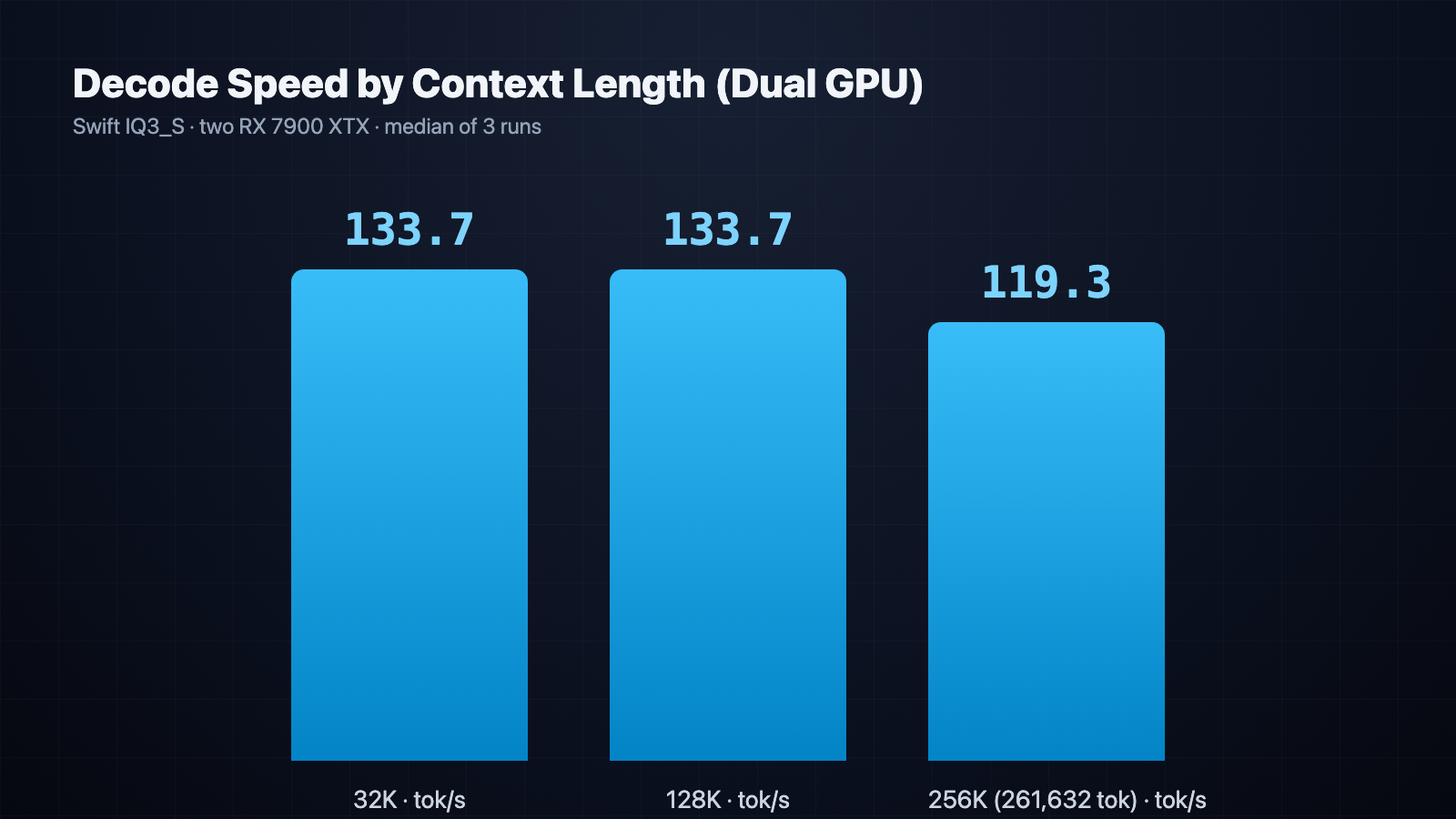
Figure 6 — decode holds at 119 tok/s even at the full 256K-token context.
What to expect. Prefill is sensitive to CPU and memory platform: the fork’s author measures 6,700+ tok/s on a 9950X3D + DDR5 machine, while this rig (3700X + DDR4) lands at 5,748. Treat the speedup ratio (1.83x) as the portable number, not the absolute figure. And never quote a cold-start number: let the 48 s of loading and one warm-up run finish before you measure.
Switching to the high-precision pack: download IQ4 instead, repack in Step 4, and point the config at the new paths. At 128K, IQ4 prefill is actually slightly faster (5,881.3 tok/s, TTFT 22.40 s) but decode drops to 114 tok/s and host RAM peaks at 83 GB. Short version: IQ3 for speed, IQ4 for code and math accuracy.
Pitfalls (each one maps to a physical constraint — check here first when a deploy fails)
- PCIe topology is the number one killer. A second card in a chipset x4 slot cuts cross-card bandwidth to a quarter, and dual-GPU performance collapses toward single-GPU. Check with the
lspcicommands in Step 2; enable x8+x8 in BIOS --kv int8is mandatory past 128K. Without it the KV cache balloons and you get an immediate OOM- Too little RAM and the kernel’s OOM killer reaps the server. Check
free -h; below 64 GB, pre-mount NVMe swap as a safety net:sudo fallocate -l 64G /swapfile && sudo chmod 600 /swapfile && sudo mkswap /swapfile && sudo swapon /swapfile - Zero VRAM headroom is normal.
--expert-cache autofills both cards to 99.8–99.9%; do not run a desktop browser on the inference box - Cold-start numbers do not count. Let the 48 s load and one warm-up run finish before measuring
- IQ4 costs 9 GB more RAM than IQ3. 83.16 GB vs 73.91 GB
max-contextmust be large enough. Set ≥ 262144 before attempting 256K, or the 261,632-token prompt simply will not fit- Do not skimp on cooling. Two cards at 303 W sustained will throttle in a bad airflow path, and your throughput will visibly sag
Bottom line
- The pairing is real. TP=2 plus dual prefill: 83% faster prefill, TTFT cut by nearly 20 seconds. Honestly below 2.0x — cross-card AllReduce is a physical ceiling — but far beyond “two models running separately”
- Old platforms hold up. No AVX-512 on the 3700X is fine; a ~98% expert-cache hit rate bypasses the memory-bandwidth bottleneck
- Pin the commit.
e1dad2dc. Cross-version comparison is meaningless - Make it a service once you are happy: a systemd unit with automatic restart and a generous start timeout is the production-ready setup (templates included in the build pack)
Questions, corrections, or a build that behaves differently? Drop a comment below or come find us on the GeekLab AI YouTube channel.
Sources: Issue #108 dual-GPU measurement report, Issue #110 IQ4 follow-up report, final_report.json / iq4_report.json benchmark data, suite.log run logs. All figures are from real hardware runs; reproduce them with the protocol in Step 6.
About The Author