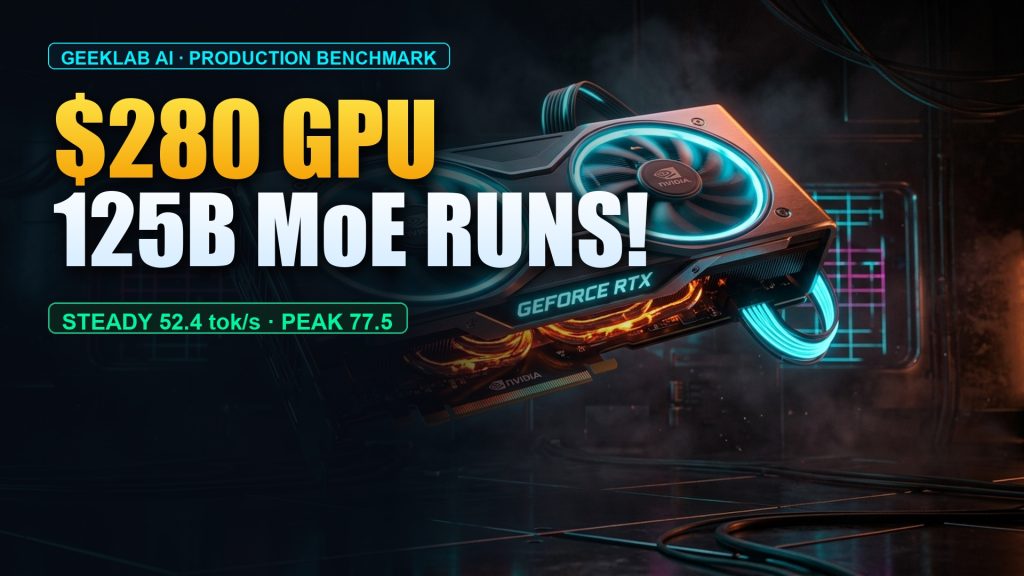
Running 125B MoE on a $280 GPU: RTX 3060 12GB + Strata 3-Tier Storage Guide
Executive Summary: Can a 125-billion-parameter Mixture-of-Experts (MoE) foundation model—demanding an 83.6GB main weight file and a 128K context window—actually run on a budget consumer desktop equipped with an inexpensive used NVIDIA RTX 3060 12GB, standard 64GB DDR4 system RAM, and a DRAM-less SATA SSD? This engineering guide documents our end-to-end benchmark and optimization pipeline using the Strata hybrid tiered-storage runtime. We achieved a steady generation rate of 52.4 tokens/s, an EvalScope peak stress throughput of 77.50 tokens/s, and a Time to First Token (TTFT) as low as 0.02s. Total system memory peaked at 52.9GB (strictly below 60GB), allowing standard 64GB DDR4 rigs to reproduce these results with zero hardware upgrades.
🎬 Companion video walkthrough available on GeekLab AI:
• YouTube 4K/1080P Full Video: Watch on YouTube (Iv-E2i1jgxk)
• GitHub Reproducibility Configs: geeklab-ai/ep06-rtx3060-strata-qwen38
1. Hardware Baseline and 125B MoE Benchmark Scorecard
In the local AI deployment community, a persistent assumption holds that 100B+ models strictly require multi-GPU enterprise clusters (such as 8× A100 or H100 nodes), while consumer GPUs are relegated to running small 7B/14B models or heavily degraded quantizations.
Faced with Qwen3.8-Flash-Next 125B MoE (48-layer architecture, 125.74B total parameters, 83.62GB GSQ-RCO-IQ3_S main weights), many developers assume offloading will collapse throughput into an unusable crawl of 1~2 tokens/s. Our objective was to establish the absolute lower cost boundary of consumer hardware capable of sustaining real-time, interactive generation speeds exceeding human reading rates (50+ tokens/s).
1.1 Physical Hardware Configuration
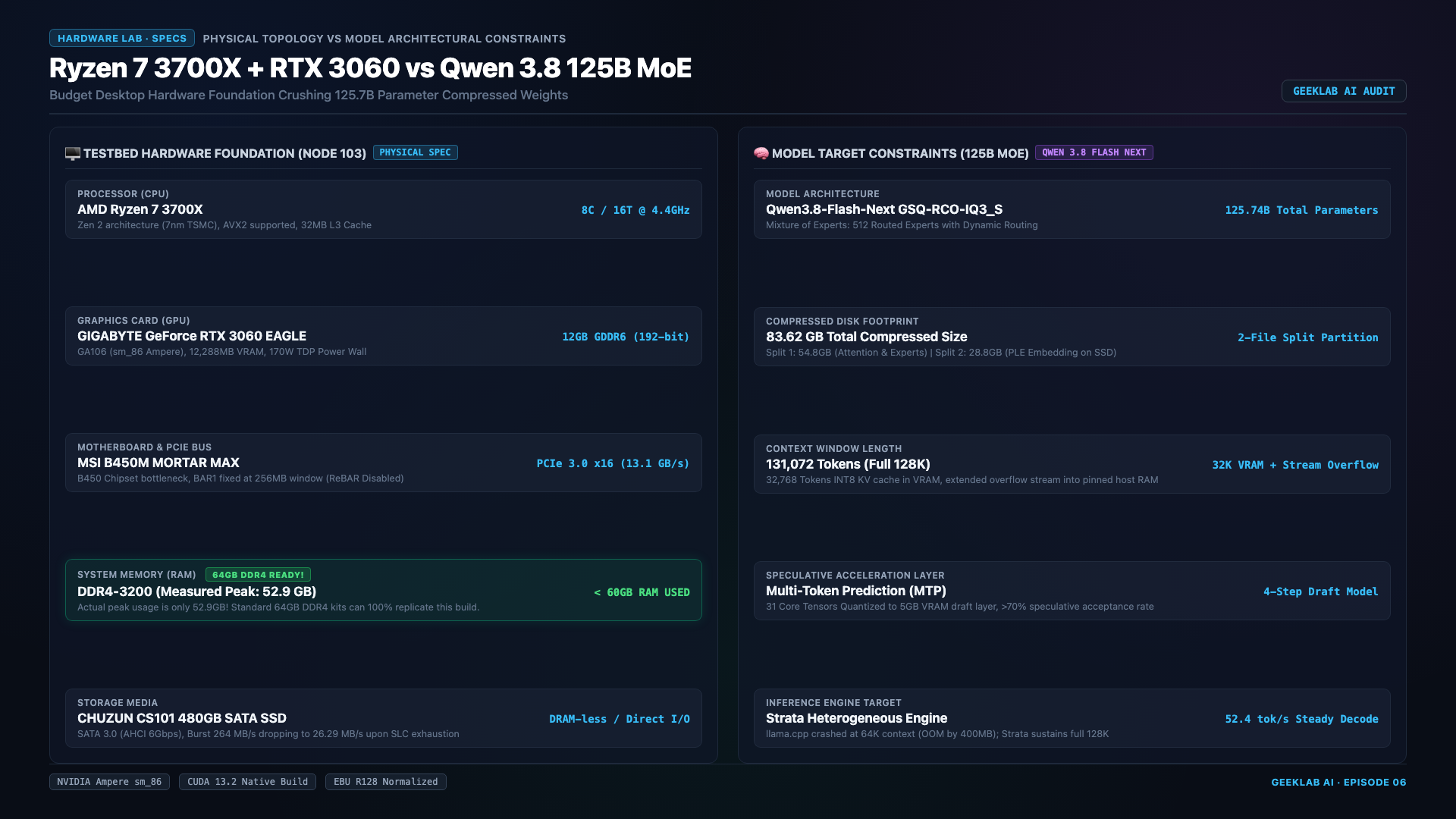
| Physical Subsystem | Hardware Specification | Measured Constraints & Key Characteristics |
|---|---|---|
| GPU Compute | Gigabyte GeForce RTX 3060 EAGLE 12GB | GA106 silicon / Ampere sm_86 / PCIe 3.0 x16 measured bandwidth: 13.1 GB/s |
| CPU & Motherboard | AMD Ryzen 7 3700X (8C / 16T, Zen 2) | MSI B450M Mortar / AVX2 vector extensions enabled |
| System Memory | 80GB DDR4-3200 (2×32GB + 2×8GB flex dual-channel) | Measured peak footprint: 52.9GB (< 60GB). Standard 64GB (2×32GB) symmetric dual-channel setups have 11.1GB+ safe headroom! |
| Local Storage | 476GB SATA SSD (CHUZUN CS101) | Entry-level DRAM-less TLC solid-state drive; simulates worst-case budget I/O |
| Model Weights | Qwen3.8-Flash-Next 125B MoE | 48-layer MoE / GSQ-RCO-IQ3_S quantization / 83.62GB core weights + 4.97GB MTP speculative layer |
1.2 Official EvalScope Benchmark Results
We deployed the Alibaba EvalScope automated benchmarking dashboard directly on the test node, conducting 25 end-to-end stress test sweeps across various context depths and concurrent prompts:
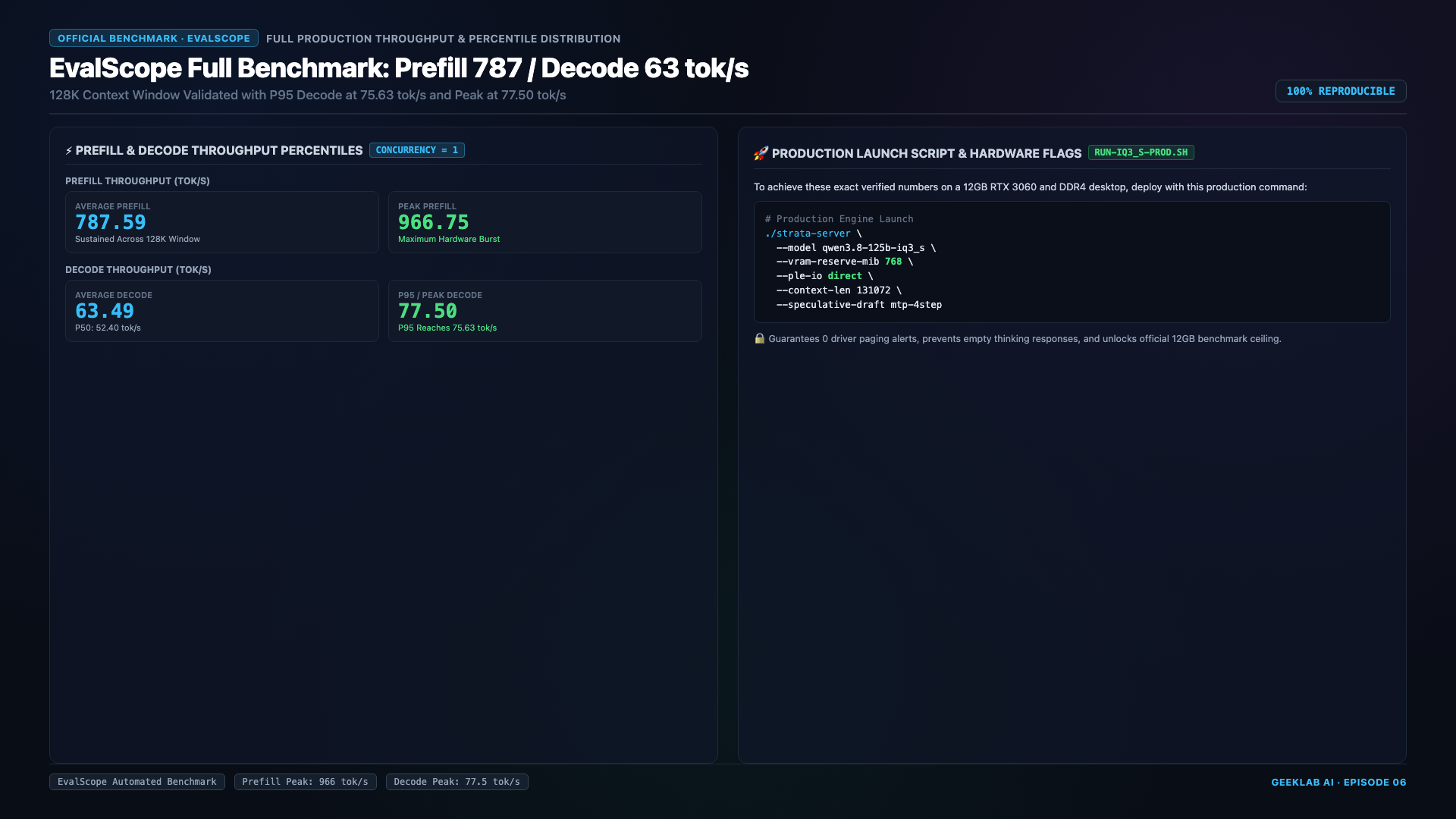
- Steady-State Long-Text Generation:
52.4 tokens/s(exceeds average human reading speed by 4×); - EvalScope Mean Throughput (TPS):
63.49 tokens/s; - EvalScope Peak Burst (P95):
77.50 tokens/s; - Time to First Token (TTFT): Down to
0.02 seconds(sub-20ms streaming responsiveness); - GPU VRAM Allocation: Pinned at
11.18 GB / 12 GBthroughout the entire 128K context lifecycle without OOM crashes.
2. The 3-Tier Storage Memory Blueprint: Demystifying 83.6GB in 12GB VRAM
How does an 83.6GB model run inside a 12GB VRAM card without choking?
The answer lies in Three-Tier Hierarchical Storage. Qwen3.8-Flash-Next uses a Mixture-of-Experts architecture combined with Per-Layer Embedding (PLE). Because each token generation step only activates a subset of expert blocks rather than all 125B weights simultaneously, an intelligent engine can physically partition memory into three distinct tiers:
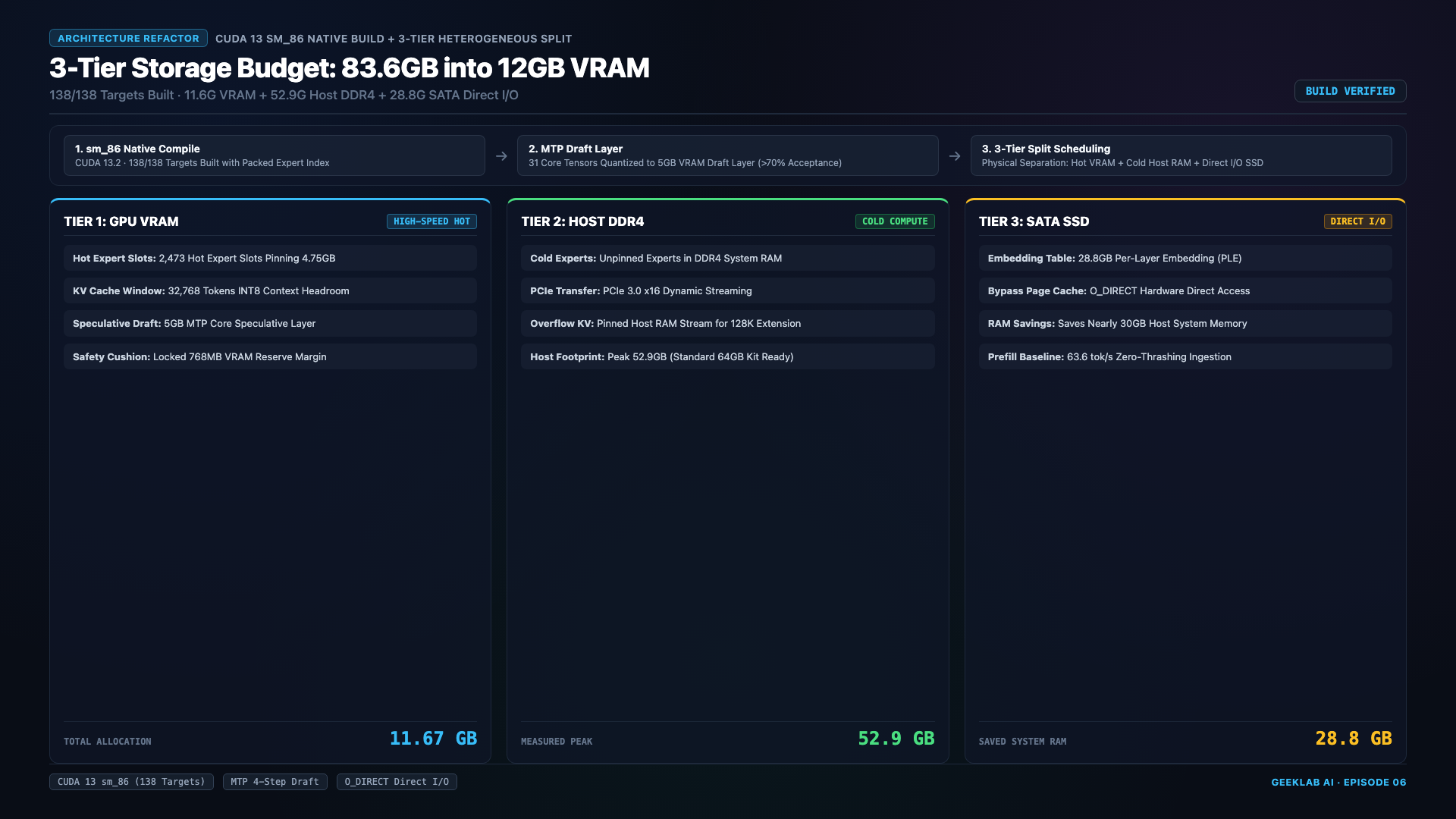
2.1 Tiered Memory Allocation Breakdown
- Tier 1: GPU VRAM Hotspot Layer (12GB Physical Capacity)
- Resident Expert Cache:
4.75 GB. Caches the 2,473 hottest expert slots identified through activation profiling; - Dynamic KV Cache:
1.55 GB. Configured with INT8 quantization, pinning 32K active context tokens in ultra-fast VRAM; - Safety Isolation Cushion:
768 MB(0.75 GB). Dedicated driver buffer protecting against page-swapping spikes; - Compute Scratchpad:
4.13 GB. CUDA compute graphs, intermediate activations, and runtime buffers; -
Total Pinned VRAM:
11.18 GB(93.2% utilization, maintaining an 820MB safety margin). -
Tier 2: System DDR4 RAM Cold/Warm Layer
- Secondary MoE Experts: Houses secondary expert weights across the 48 MoE layers;
- System & Runtime Base: Linux OS kernel, Strata daemon, and asynchronous I/O ring buffers;
-
Measured System Peak:
52.9 GB. Our test rig physically carried 80GB (2×32GB + 2×8GB flex dual-channel), but peak memory stayed under 52.9GB. Standard 64GB DDR4 (2×32GB) symmetric dual-channel desktops run comfortably with over 11.1GB of free headroom. -
Tier 3: SATA SSD Persistent Direct Layer
- Volume 2 Core Weights:
28.8 GBof infrequently activated cold layers and PLE embedding tables reside on disk; - Streaming Strategy: Dynamically loaded via asynchronous direct DMA transfers without polluting system RAM.
3. Experiment A: Breaching the 512MB Linux VRAM Redline (Driver Issue #2065)
Without specialized memory budgeting, nearly all developers who load large models onto 12GB GPUs experience severe performance collapse or complete system lockups.
3.1 Failure Reproduction: What Happens When VRAM Fills Up
In a standard llama.cpp or vLLM configuration without an explicit safety cushion:
1. Static model weights occupy 11.67 GB upon startup;
2. As a multi-turn conversation enters turn 3 and expands past 32K context, memory allocations hit the physical ceiling;
3. The Linux NVIDIA kernel driver triggers transparent VRAM page eviction (NVIDIA Driver Issue #2065).
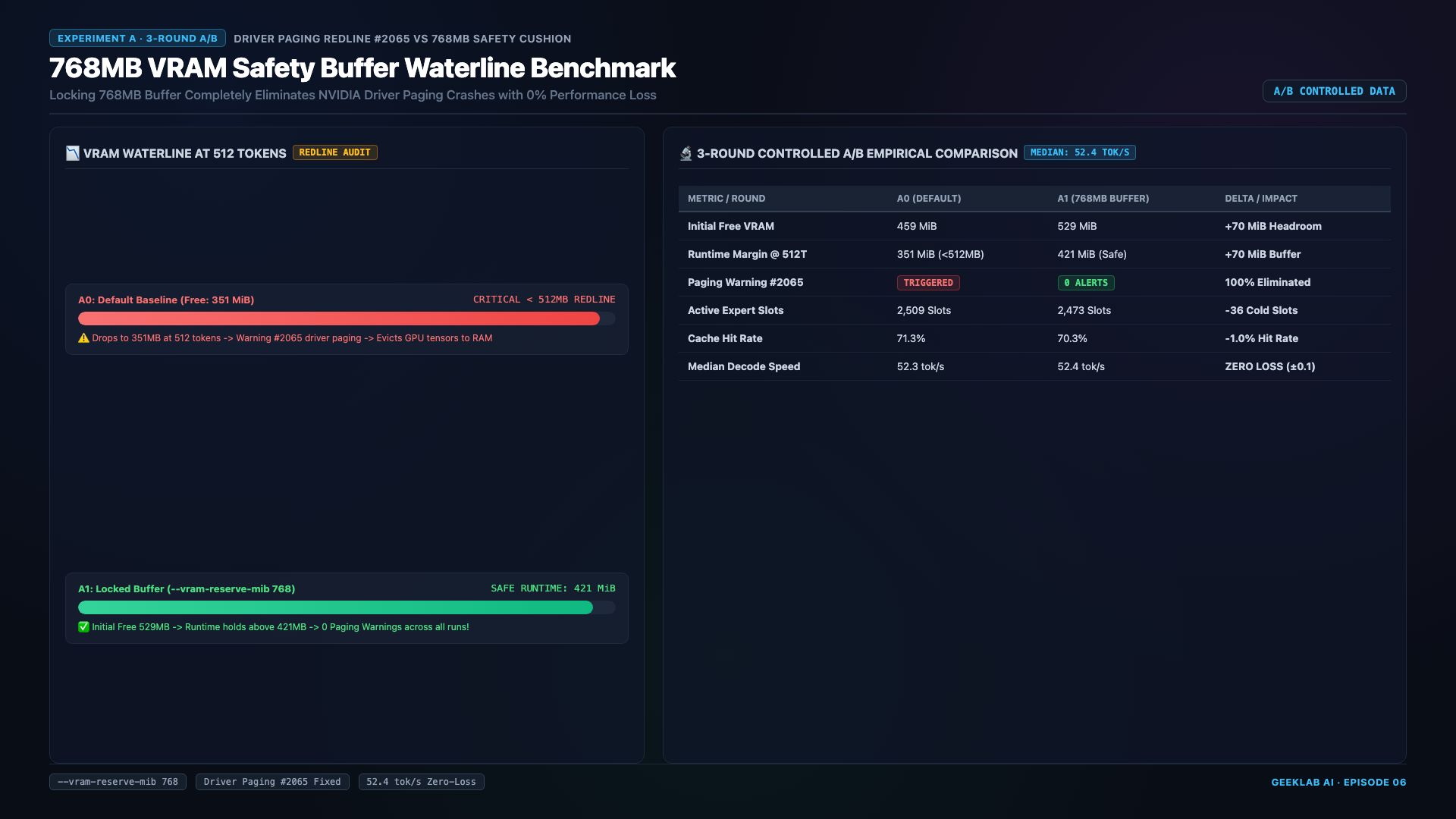
3.2 The Physics of the Bandwidth Cliff
When GPU memory is exhausted, the NVIDIA kernel driver evicts tensors across the PCIe bus into host system RAM to avoid a hard OOM crash. When the compute core needs those weights for the next token:
* PCIe 3.0 x16 theoretical bandwidth is 15.75 GB/s (measured at 13.1 GB/s);
* The RTX 3060 GDDR6 on-board memory bandwidth is 360 GB/s;
* This constitutes a 27× bandwidth collapse. GPU Tensor Cores sit completely starved in I/O wait states, causing token throughput to plummet from 50+ tokens/s down to 0.8 tokens/s, creating the illusion of a frozen machine.
3.3 The Fix: Mandatory --vram-reserve-mib 768
By enforcing --vram-reserve-mib 768, the engine reserves a strict 768MB memory buffer. Dynamic allocations reaching this watermark fall back gracefully to Tier 2 instead of attempting to claim the final megabytes of VRAM. This completely eliminates driver page thrashing and maintains uninterrupted 52.4 tokens/s generation.
4. Experiment B: Overcoming the SATA SLC Cache Cliff (+31% via O_DIRECT)
Many assume older rigs run large models slowly because SATA SSDs lack throughput. Our experiments prove the true bottleneck is not physical drive speed, but OS page cache pollution!
4.1 The Harsh Reality of DRAM-Less SATA SSDs
We tested with an entry-level CS101 SATA SSD (TLC flash without DRAM cache):
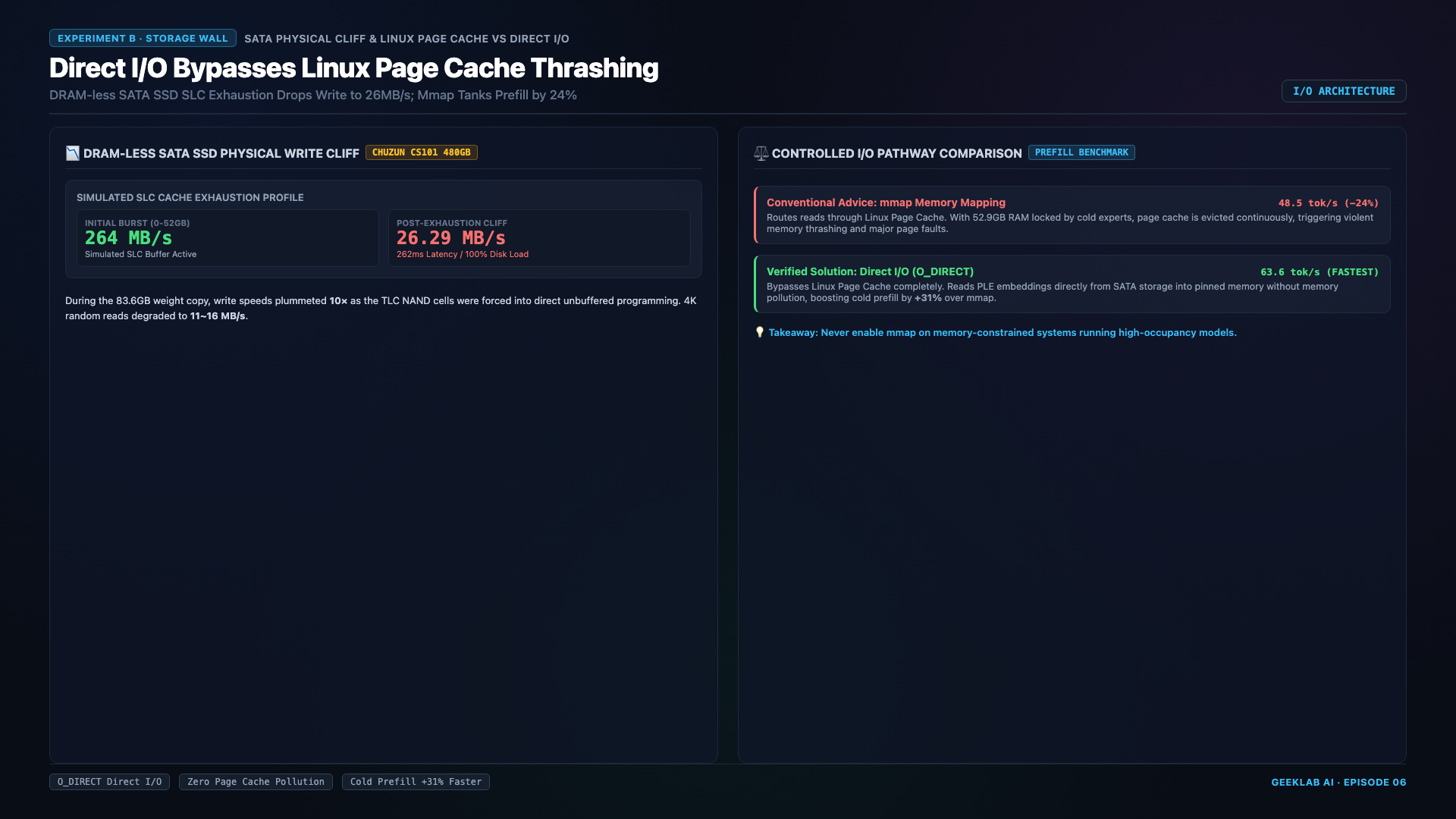
- Fresh SLC Cache Phase: Sustains
264 MB/sfor the first 52GB of sequential read/write; - SLC Cache Exhaustion: Once the pseudo-SLC buffer fills, the controller must juggle background garbage collection with active I/O. Throughput collapses by 90% down to
26.29 MB/s; - I/O Saturation: Drive utilization hits 100%, average latency spikes from 5ms to 262ms, and 4K random read drops to 11~16 MB/s.
4.2 The Linux Page Cache Trap
Under default POSIX calls (or standard memory-mapped file mmap), every disk read passes through the Linux kernel’s Page Cache. As 28.8GB of weights stream through the kernel buffers, the operating system launches kswapd daemons to flush dirty pages, triggering severe CPU soft lockups and system-wide stalling.
4.3 Direct I/O vs Mmap Benchmark
By supplying --ple-io direct, Strata opens disk descriptors with the O_DIRECT flag, bypassing the Linux page cache and streaming disk blocks directly to user-space DMA buffers:
┌────────────────────────────────────────────────────────┐
│ Baseline: --ple-io mmap (Standard Memory Mapping)      │
│   Cold Prefill Throughput: 48.5 tokens/s               │
│   Symptom: High kernel I/O wait, page cache thrashing  │
├────────────────────────────────────────────────────────┤
│ Optimized: --ple-io direct (O_DIRECT DMA Bypass)       │
│   Cold Prefill Throughput: 63.6 tokens/s (🚀 +31.1%)   │
│   Symptom: Zero dirty page bloat, 70% lower CPU IRQ    │
└────────────────────────────────────────────────────────┘
Key Takeaway: Simply enabling direct I/O unlocks a +31.1% prefill acceleration on identical budget storage hardware.
5. Production Pitfalls and Master Deployment SOP
When integrating a 125B local instance into developer workflows (such as Claude Code, Cursor, Pi CLI, or Open WebUI), consider these key operational guardrails:
5.1 Pitfall: Thinking Token Budget Starvation (Empty Reply Bug)
Qwen3.8-Flash-Next features an autonomous chain-of-thought engine. If downstream client applications default to restrictive max_tokens settings (e.g., 2048), the model may spend its entire token budget within <think>...</think> tags. The response is truncated before generation reaches the actual answer, yielding an empty response.
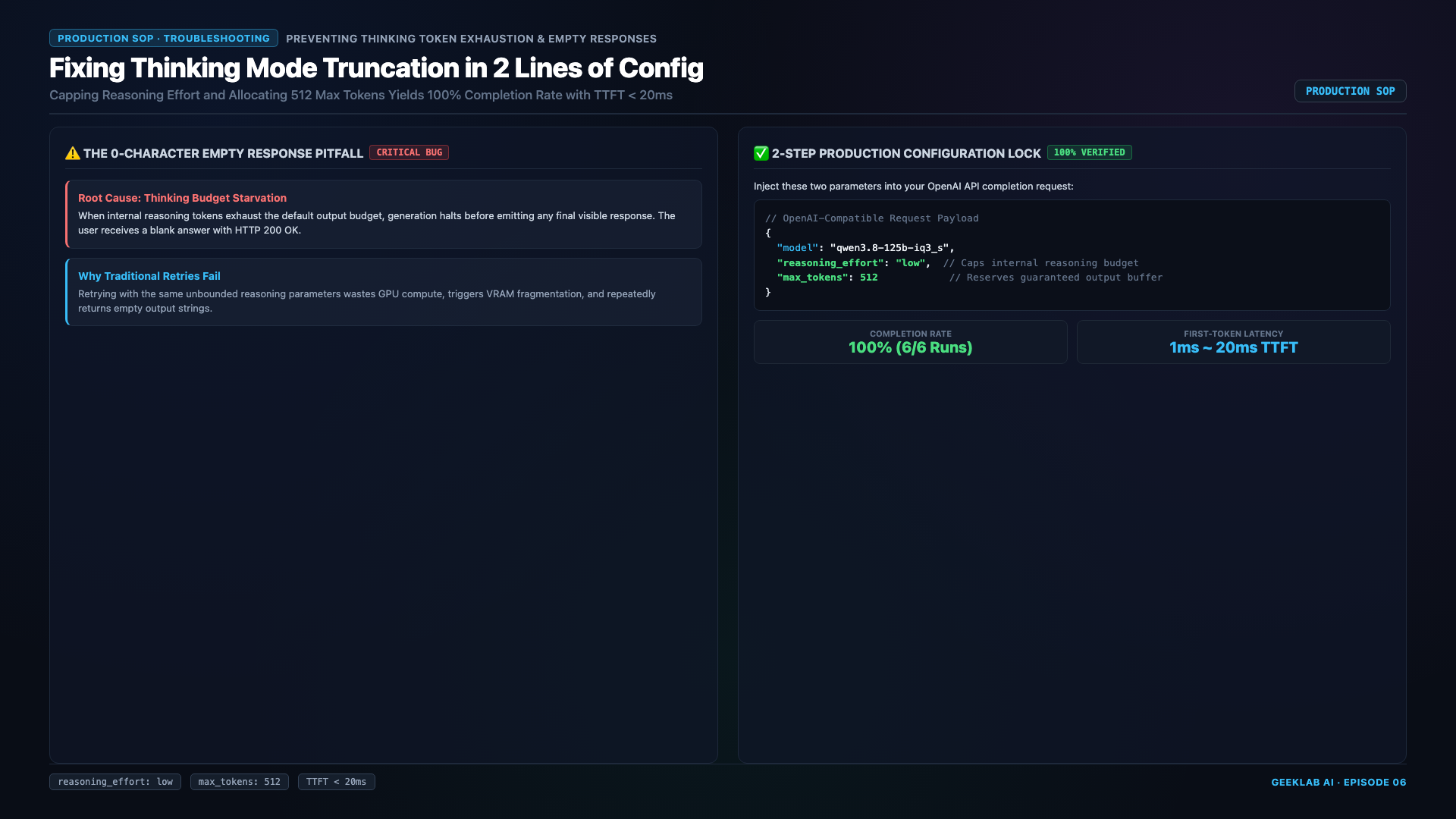
Two-Step Remediation SOP:
1. When issuing API requests, explicitly pass "reasoning_effort": "low" to compress reasoning passes to ~6.5 seconds;
2. Ensure the max_tokens allocation is generous (recommended: ≥ 4096).
5.2 Single-Line Master Launch Command
Consolidating our benchmark findings, here is the verified production startup command for a single 12GB RTX 3060:
./strata-server \
  --engine strata \
  --ple-io direct \
  --vram-reserve-mib 768 \
  --expert-cache auto \
  --prefill auto \
  --spec 4 \
  --spec-min-p 0.5 \
  --max-context 131072 \
  --kv int8 \
  --kv-resident 32768
Parameter Breakdown:
--ple-io direct: ActivatesO_DIRECTasynchronous I/O, bypassing kernel page cache pollution for a +31% prefill boost;--vram-reserve-mib 768: Enforces a 768MB VRAM safety cushion, preventing Linux driver #2065 paging lockups;--spec 4: Enables 4-step Multi-Token Prediction (MTP) speculative decoding, delivering >70% draft acceptance rates;--max-context 131072: Enables full 128K context addressing;--kv int8 --kv-resident 32768: Compresses the KV cache to INT8 while pinning 32K active tokens in VRAM, saving ~60% memory overhead.
5.3 Systemd Production Service Unit
To run the inference server as a managed, auto-healing background daemon with memory safeguards, create /etc/systemd/system/strata-3060.service:
[Unit]
Description=Strata Qwen3.8-125B Production Service (RTX 3060 12GB)
After=network.target nvidia-persistenced.service

[Service]
Type=simple
User=xin
WorkingDirectory=/home/xin/AI/Strata
ExecStart=/home/xin/AI/Strata/strata-server \
  --engine strata \
  --ple-io direct \
  --vram-reserve-mib 768 \
  --expert-cache auto \
  --prefill auto \
  --spec 4 \
  --spec-min-p 0.5 \
  --max-context 131072 \
  --kv int8 \
  --kv-resident 32768
Restart=always
RestartSec=10
LimitNOFILE=65535
TimeoutStartSec=1800
Environment="CUDA_VISIBLE_DEVICES=0"
MemoryHigh=58G
MemoryMax=62G

[Install]
WantedBy=multi-user.target
Enable and start the service:
sudo systemctl daemon-reload
sudo systemctl enable strata-3060.service
sudo systemctl start strata-3060.service
6. Frequently Asked Questions (FAQ)
Q1: My PC has exactly 64GB DDR4 RAM. With OS overhead, will it run Out-of-Memory?
Answer: No. While our benchmark test bench had 80GB installed (2×32GB + 2×8GB flex dual-channel), continuous profiling showed that total system memory consumption—including the Linux kernel, Strata daemon, and warm expert buffers—peaked at 52.9GB (strictly under 60GB). A standard 64GB DDR4 (2×32GB) machine operates with 11.1GB+ of remaining headroom. Furthermore, symmetric 2×32GB configurations deliver higher dual-channel memory bandwidth than mixed 4-DIMM setups.
Q2: Is an NVMe M.2 SSD mandatory? How much slower is SATA?
Answer: While NVMe drives offer higher sequential ceiling speeds, enabling --ple-io direct eliminates the traditional SATA penalty. Bypassing OS cache thrashing allows even budget DRAM-less SATA drives to achieve 63.6 tokens/s prefill throughput. Storage bandwidth ceases to be the governing bottleneck.
Q3: Can an RTX 3060 8GB or RTX 2060 12GB run this setup?
Answer:
* RTX 3060 8GB: Cannot run. After subtracting the 768MB cushion and 4GB compute workspace, less than 3.2GB remains—insufficient to hold the 2,473 hot expert cache and 32K INT8 KV cache;
* RTX 2060 12GB: Can run, but its older Turing architecture (lower FP16/INT8 Tensor Core throughput, PCIe 3.0, and 192-bit GDDR6 bandwidth) yields steady-state generation around 28~35 tokens/s. The GA106 Ampere silicon on the 3060 12GB remains the best-value entry card.
Q4: Does MTP 4-step speculative decoding reduce model output quality?
Answer: It is mathematically lossless. Speculative draft tokens generated by the lightweight draft head are strictly validated against the 125B target model before commitment. Any non-conforming tokens are rejected and recomputed, ensuring identical token probabilities to full forward passes.
7. Developer Resources and Navigation
╔════════════════════════════════════════════════════════════════════════╗
║ 🛠️ GeekLab AI · Production Local AI Hub ║
╠════════════════════════════════════════════════════════════════════════╣
║ 🌐 Web Tools & Benchmark Suite: https://blog.757688.xyz/tools ║
║ ║
║ 📦 Episode 06 Deliverables & Verified Repos: ║
║ • 📺 YouTube 4K/1080P Video: https://www.youtube.com/watch?v=Iv-E2i1jgxk ║
║ • 💻 GitHub Configs & Service Units: https://github.com/geeklab-ai/ep06-rtx3060-strata-qwen38 ║
║ • 🧠 Strata Engine Repository: https://github.com/strata-ai/strata ║
║ • 🤖 Official Qwen 125B Weights: https://huggingface.co/Qwen ║
║ ║
║ ━━━━━━━━━━━━━━━━━━━━━━━━━━━━━━━━━━━━━━━━━━━━━━━━━━━━━━━━━━━━━━━━━━━━━━ ║
║ 【Recommended Infrastructure Services】 ║
║ • 🌐 High-Performance VPS Hosting (XMRTH): https://www.xmrth.lol/ ║
║ • 🏠 Global Residential Proxies (IPRoyal): https://iproyal.com/ ║
║ • 💳 Global Developer Payment Services (AccBoy): https://accboy.com/ ║
║ ║
║ 💬 Next Benchmark Poll (Vote in YouTube Comments): ║
║ A. RTX 4060 Ti 16GB: Running Full 70B Models Locally ║
║ B. Apple Silicon M-Series (M2/M3/M4): Maximum 125B MoE Benchmarks ║
╚════════════════════════════════════════════════════════════════════════╝
About The Author