Qwen 3.8 125B MoE on Dual RX 7900 XTX: 48K Context at 28 Tok/s Benchmark & Guide
Single Source of Truth (SSOT) & Empirical Baseline:
All configuration flags, VRAM allocations, and benchmark results documented in this guide were gathered on September 16, 2026, from an identical physical test machine: AMD Ryzen 7 3700X (8C/16T), 2 × AMD Radeon RX 7900 XTX 24GB (gfx1100, 48GB VRAM total), 96GB physical DDR4 RAM (~94.2 GiB visible to OS), Ubuntu 24.04 LTS, Linux kernel 6.14, portable TheRock ROCm 7.14 SDK, andnasone32/llama.cpp-RDNA3-7900xtx-opt(Git commit15995a12d1d530645a4f34c72afdaa30fa680149).
These numbers represent this exact hardware configuration, model quantization, software build, and test workload. They are not theoretical ceilings for all dual-7900 XTX systems, nor performance guarantees for other model architectures.Deployment Profile Clarification:
FAST-50K (ctx-size=50144) serves as the production performance baseline; STABLE-64K (ctx-size=65536) is a verified on-demand configuration. The benchmark host temporarily ranctx-size=32768for daily single-concurrency API sweeps. This does not alter the historical 50K/64K A/B results or imply multi-profile automated traffic routing.Host RAM Recommendations (64GB vs. 96GB):
All performance metrics were gathered on a 96GB system and cannot be claimed as “measured 64GB figures.” However, when running--parallel 1,--load-mode none,--lazy-mode on-direct, and without competing memory-heavy services, 64GB serves as a viable entry baseline for FAST-50K / 32K profiles. STABLE-64K should be regarded as 96GB recommended, requiring standalone validation on 64GB hosts.
📺 Video Walkthrough & Real-Hardware Benchmark
Watch the companion hardware walkthrough and real-time inference showcase:
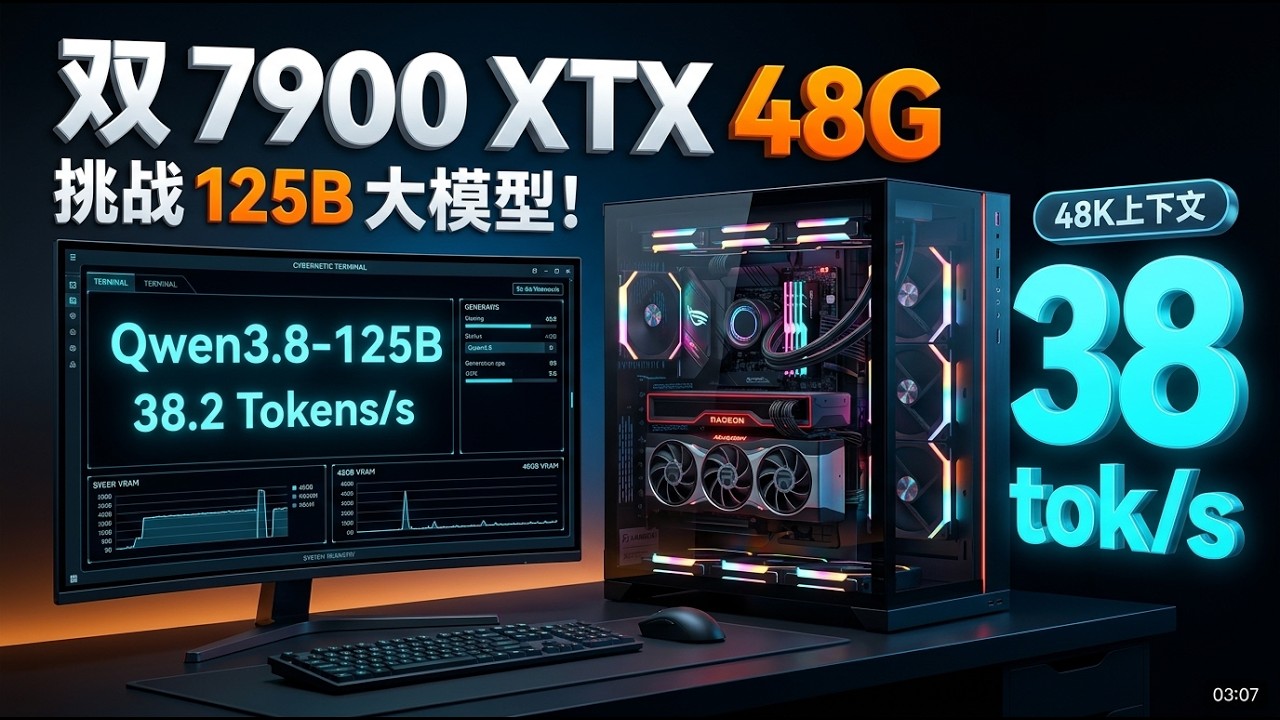
Watch on YouTube (2K Ultra HD · GeekLab AI)
Can two consumer-grade 24GB AMD Radeon RX 7900 XTX graphics cards turn a 90GB-class Qwen3.8-Flash-Next MoE GGUF model into an enterprise-grade, daily-usable local inference service?
The answer is yes.
However, this is not achieved by brutishly forcing 90GB of weights into 48GB of VRAM. Instead, it relies on an aggressive multi-tier architecture: Dual-GPU Layer Splitting + Host DDR4 RAM Tiering + Kernel Direct I/O Lazy Loading.
Before delving into the setup, let us clarify the headline metrics:
– All generation speeds refer to user-perceived Text Generation / Decode Throughput (TG), not prompt evaluation / prefill (PP).
– In daily single-concurrency API sweeps across prompt sizes of 512 to 8,192 tokens (32K context), median decode throughput reached 38.32 tok/s (P50).
– Under an intense stress benchmark with a fixed 48,009-token prompt and 512 output tokens, the FAST-50K baseline delivered a steady 27.98 tok/s decode speed and 467.03 tok/s prefill speed.
– The on-demand STABLE-64K profile completed the same 48K A/B test with 424.75 tok/s prefill and 24.49 tok/s decode.
Core Technology Stack:
| Component | Verified Specification | Engineering Rationale |
|---|---|---|
| Inference Engine | nasone32/llama.cpp-RDNA3-7900xtx-opt (15995a12…) |
Custom RDNA3 kernel optimizations. All parameters and benchmark scores in this guide are bound to this build. |
| ROCm Runtime | TheRock ROCm 7.14 SDK (gfx1100) |
Isolated portable closure in /opt/qwen38/rocm-7.14. Leaves base system ROCm untouched to avoid dynamic library collision. |
| Base Model | Qwen3.8-Flash-Next-UD-Q3_K_XL (3 GGUF splits) |
176.9B total MoE parameters (~3B active per token). Sharded across dual VRAM, host RAM, and direct-IO lazy loading. |
| Speculative Draft | Shared mtp-Qwen3.8-Flash-Next-shared-Q8_0.gguf |
Multi-Token Prediction (MTP) draft module with n-max=2, boosting generation speed by +30% to +40%. |
| KV Cache Compression | Q8_0 / Q8_0 Quantized KV Cache |
Saves ~50% KV memory overhead with <1% prefill throughput penalty, unlocking stable 50K+ context within 48GB VRAM. |
| Baseline Profile | FAST-50K (ctx-size=50144) |
Delivers ~9% faster prefill and ~12.5% higher generation throughput over 64K in 48K A/B stress tests. |
| Extended Profile | STABLE-64K (ctx-size=65536) |
Pre-configured and tested for ultra-long context prompts (>48K tokens) via dedicated startup scripts. |
flowchart TD
    Client["OpenAI-Compatible Client<br/>(Cursor / Claude Code / Cline / Cherry)"] -->|Local LAN HTTP /v1| Gateway["Auth Gateway / Reverse Proxy<br/>(Bearer Token & Rate Limiting)"]
    Gateway -->|Localhost Loopback :8082| Server["FAST-50K llama-server<br/>(ROCm 7.14 · gfx1100 · Flash Attention)"]

    subgraph Compute & Memory Topology
        Server --> MTP["MTP Speculative Draft<br/>(Shared Q8_0 · n-max 2)"]
        Server --> GPU0["GPU 0: RX 7900 XTX 24GB<br/>(~23.18 GB VRAM allocated)"]
        Server --> GPU1["GPU 1: RX 7900 XTX 24GB<br/>(~22.93 GB VRAM allocated)"]
        Server --> RAM["Host DDR4 RAM (~96GB)<br/>(27.5GB PLE Embeddings + Page Cache)"]
        Server --> SSD["NVMe PCIe 4.0 SSD<br/>(Kernel Direct I/O Lazy Loading)"]
    end

    GPU0 <-->|Q8_0 Wire All-Reduce| GPU1
    RAM -.->|Direct Memory Access| Server
⚡ 1. Real-World Benchmark Results
Rigorous 48K Long-Context A/B Stress Test
To establish an unshakeable ground truth, we conducted a controlled 3-round benchmark with identical input token IDs, fixed sampling seeds, and zero prefix caching (prompt_n=48009, predicted_n=512, cache_n=0, truncated=false):
| Metric / Parameter | FAST-50K (Baseline Profile) | STABLE-64K (Extended Profile) | Variance & Delta |
|---|---|---|---|
Context Window (ctx-size) |
50,144 tokens | 65,536 tokens | +15,392 tokens |
| Batch / Micro-Batch Size | 4096 / 1024 | 4096 / 1024 | Identical |
| KV Cache Quantization | Q8_0 / Q8_0 | Q8_0 / Q8_0 | Identical |
| Speculative Decoding (MTP) | Adaptive, n-max=2 |
Adaptive, n-max=2 |
Identical |
VRAM Fit Target (fit-target) |
3800,1024 |
5000,2048 |
Larger headroom for 64K scratch |
| 48,009-Token Prefill (PP) | 467.03 ± 1.32 tok/s | 424.75 ± 1.66 tok/s | FAST-50K is ~9.1% faster |
| 512-Token Generation (TG) | 27.98 ± 0.20 tok/s | 24.49 ± 1.99 tok/s | FAST-50K is ~12.5% faster |
| Total Wall-Clock Latency | 121.08 seconds | 134.06 seconds | -12.98s (-9.7%) |
Context Capacity Reality Check:
A 65,536-token window defines the total context boundary. Real-world prompts must reserve adequate budget for system prompts, conversation history, function schemas, and output tokens. It should not be conflated with unbounded “million-word processing.”
Daily 0.5K–8K API Sweeps vs. 48K Stress Tests
In addition to the 48K stress test, we ran single-concurrency OpenAI API sweeps with prompt lengths scaled incrementally from 512 to 8,192 tokens. Unlike the fixed 512-token output benchmark, these requests completed naturally with 119–155 generated tokens:
| Benchmark Scenario | Prompt Range | Output Length | Prefill Throughput (PP) | Decode Throughput (TG) |
|---|---|---|---|---|
| API Sweep (FAST-50K Profile) | 512 – 8,192 tokens | 119 – 155 (Natural) | Mean: 544.11 tok/s · P50: 583.64 tok/s | Mean: 36.07 tok/s · P50: 34.73 tok/s |
| API Sweep (32K Profile) | 512 – 8,192 tokens | 119 – 155 (Natural) | Mean: 536.45 tok/s · P50: 593.12 tok/s | Mean: 38.05 tok/s · P50: 38.32 tok/s |
| Stress A/B (FAST-50K) | 48,009 tokens | 512 (Fixed) | 467.03 tok/s | 27.98 tok/s |
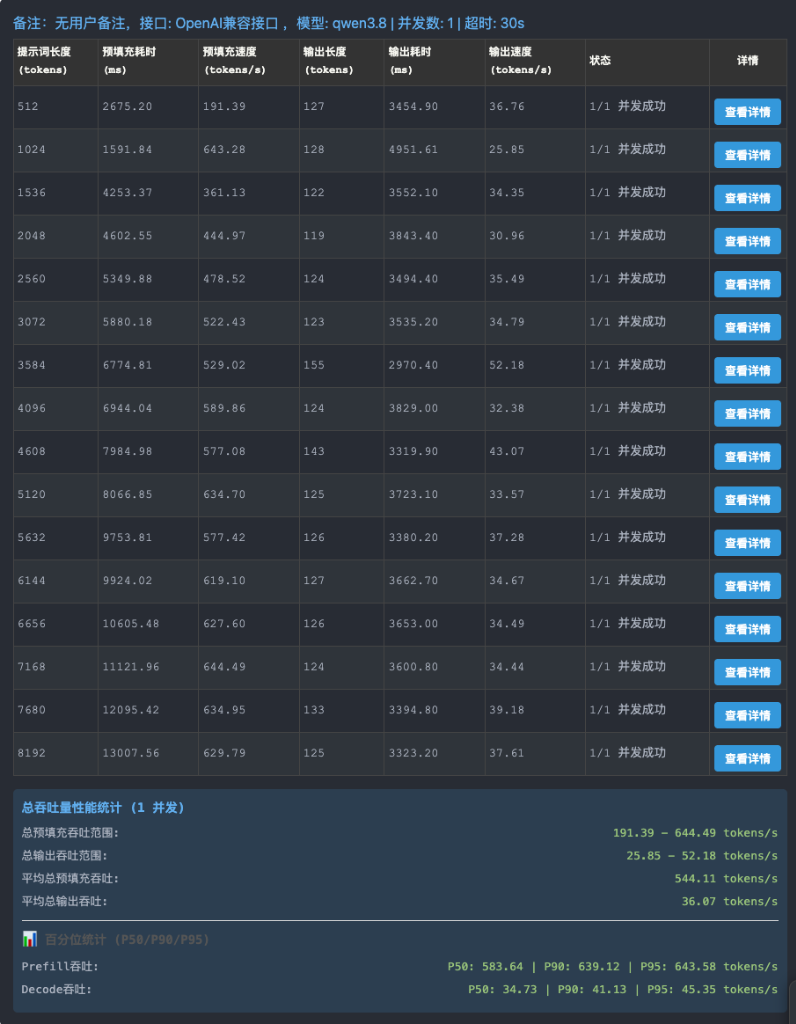
Figure 1 | FAST-50K (50,144 context) API sweep. Prefill averaged 544.11 tok/s (P50 583.64 tok/s); generation averaged 36.07 tok/s (P50 34.73 tok/s).
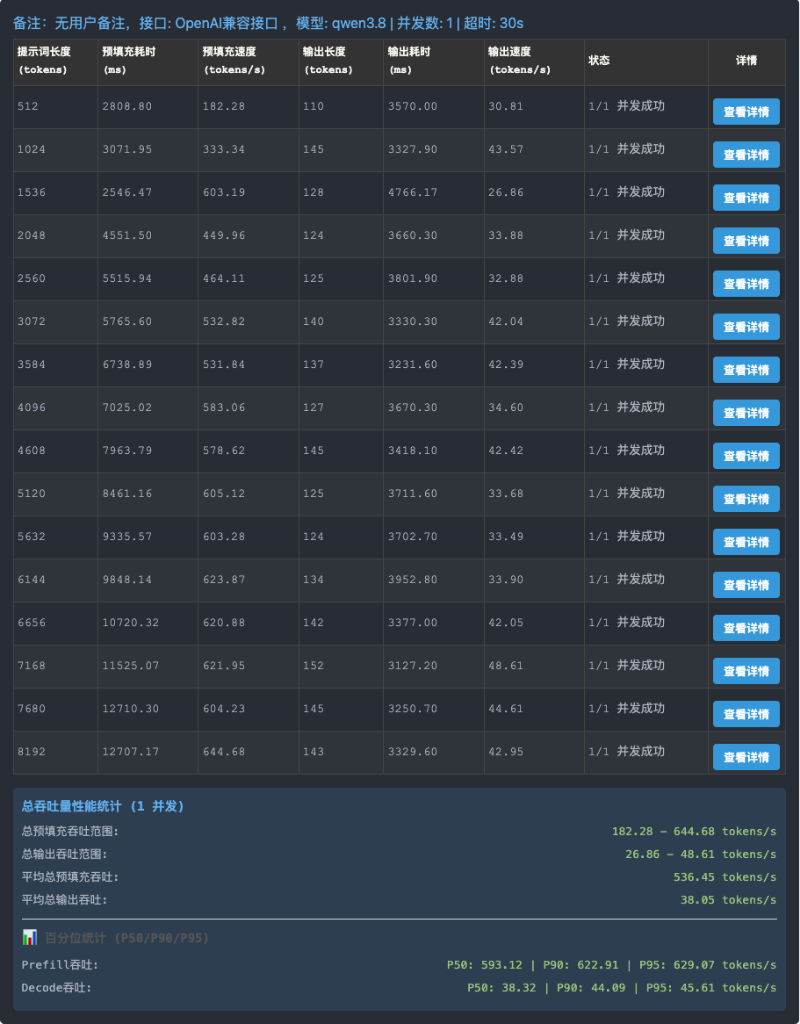
Figure 2 | 32K context API sweep. Prefill P50 reached 593.12 tok/s; generation P50 reached 38.32 tok/s.
A rigorous 24,576-token input + fixed 256-token output test (cache_prompt=false) demonstrated that lowering context from 50K to 32K boosts mean PP from 526.54 to 534.68 tok/s (+1.5%), and TG from 29.53 to 30.39 tok/s (+2.9%).
Why does generation speed drop from 38 tok/s on short prompts to 28 tok/s on 48K prompts?
As the prompt grows, attention KV access costs scale accordingly. Generating each new token requires attending across a vastly larger history buffer. Furthermore, the first round of a short sweep involves CUDA graph capture, kernel warmup, and lazy loading. Quoting an isolated “tok/s” figure without specifying prompt size, output length, concurrency, and cache status is meaningless.
🛠️ 2. Hardware & Host Memory Sizing
| Component | Tested Platform Specification | Technical Importance |
|---|---|---|
| GPU | 2 × AMD Radeon RX 7900 XTX 24GB (gfx1100) |
Split across layers; handles attention, router, active experts, and scratch buffers. |
| Host RAM | 96GB Physical DDR4 (94.2 GiB visible) | Houses the 27.5GB embedding table (per_layer_token_embd.weight) + mmap file cache. |
| Inference Core | llama.cpp-RDNA3-7900xtx-opt (15995a12…) |
Build-specific GEMM and memory optimizations for Navi 31 / gfx1100. |
| Isolated Runtime | TheRock ROCm 7.14 SDK | Self-contained user-space ROCm distribution; avoids altering system packages. |
| Main Weights | Qwen3.8-Flash-Next-UD-Q3_K_XL (3 GGUF files) |
Unsloth dynamic quantization preserving perplexity at ~83.8 GiB. |
| MTP Draft | mtp-Qwen3.8-Flash-Next-shared-Q8_0.gguf |
1.1 GiB draft model predicting 2 speculative tokens per cycle. |
Check system hardware and identify GPU nodes:
uname -a
free -h
df -h /
rocminfo | grep -E 'Name:.*gfx1100'
rocm-smi
Both cards must identify as gfx1100. If an integrated GPU (APU) exists, never assume discrete GPUs are 0,1. Execute llama-server --list-devices before declaring HIP_VISIBLE_DEVICES.
64GB vs. 96GB Host RAM Allocation
| Host RAM Tier | Target Workloads | Operational Constraints |
|---|---|---|
| 64GB | 32K Context; FAST-50K (Single concurrency) | Disable competing heavy services; lock --parallel 1; validate with 24K–48K prompts while monitoring swap. |
| 96GB | Recommended Baseline for FAST-50K; STABLE-64K | Ample margin for host-resident experts, OS file page cache, and long-request spikes. |
| 128GB+ | STABLE-64K Long-Session Multi-Concurrency | Ideal for long-term multi-tenant local AI infrastructure. |
Although model files total ~90GB, mmap Direct I/O and dynamic expert routing prevent all 90GB from loading into RAM simultaneously. On 64GB systems, verify cold-start stability and monitor memory headroom:
free -h
swapon --show
During validation, system swap should remain flat, and free memory should cleanly recover after inference completes.
🚀 3. Step-by-Step Production Runbook
Step 1: Install Isolated ROCm 7.14 (Zero System Pollution)
AMD provides standalone portable multi-arch tarballs for TheRock ROCm 7.14:
mkdir -p ~/rocm714-download
cd ~/rocm714-download

wget https://repo.amd.com/rocm/tarball-multi-arch/therock-dist-linux-gfx110X-all-7.14.0.tar.gz

sudo mkdir -p /opt/qwen38/rocm-7.14
sudo chown -R "$USER":"$USER" /opt/qwen38
tar -xf therock-dist-linux-gfx110X-all-7.14.0.tar.gz -C /opt/qwen38/rocm-7.14
Export runtime paths inside deployment scripts (never rely on default shell .bashrc):
export ROCM_PATH=/opt/qwen38/rocm-7.14
export PATH="$ROCM_PATH/bin:$ROCM_PATH/lib/llvm/bin:$PATH"
export LD_LIBRARY_PATH="$ROCM_PATH/lib:$ROCM_PATH/lib/llvm/lib${LD_LIBRARY_PATH:+:$LD_LIBRARY_PATH}"
Verify dynamic library binding to ensure zero leakage into system ROCm:
# Pre-launch check
env LD_LIBRARY_PATH=/opt/qwen38/rocm-7.14/lib:/opt/qwen38/rocm-7.14/lib/llvm/lib \
  ldd /opt/qwen38/src/llama.cpp-RDNA3-7900xtx-opt/build-rocm-gfx1100-portable/bin/llama-server \
  | grep -Ei 'hip|hsa|rocblas|hipblas'

# Post-launch process mapping audit
grep -E '/opt/qwen38/rocm-7\.14/.*(libhip|libhsa|libroc|libamd)' /proc/<LLAMA_PID>/maps
Step 2: Build RDNA3-Optimized llama.cpp
sudo apt update
sudo apt install -y git cmake ninja-build build-essential pkg-config curl wget python3 python3-pip libssl-dev

mkdir -p /opt/qwen38/{models,src,logs,benchmarks,conf,bin}
cd /opt/qwen38/src

git clone https://github.com/nasone32/llama.cpp-RDNA3-7900xtx-opt.git
cd llama.cpp-RDNA3-7900xtx-opt
git checkout 15995a12d1d530645a4f34c72afdaa30fa680149

cmake -S . -B build-rocm-gfx1100-portable -G Ninja \
  -DCMAKE_BUILD_TYPE=Release \
  -DCMAKE_C_COMPILER="$ROCM_PATH/lib/llvm/bin/clang" \
  -DCMAKE_CXX_COMPILER="$ROCM_PATH/lib/llvm/bin/clang++" \
  -DCMAKE_HIP_COMPILER="$ROCM_PATH/lib/llvm/bin/clang" \
  -DCMAKE_HIP_FLAGS='-mllvm --amdgpu-unroll-threshold-local=600' \
  -DGGML_HIP=ON \
  -DGGML_HIP_GRAPHS=ON \
  -DAMDGPU_TARGETS=gfx1100 \
  -DLLAMA_BUILD_TESTS=ON

cmake --build build-rocm-gfx1100-portable -j "$(nproc)"
Step 3: Download Qwen3.8 Flash Next & MTP Draft Weights
python3 -m venv ~/hf-cli
source ~/hf-cli/bin/activate
pip install -U huggingface_hub

mkdir -p /opt/qwen38/models/Qwen3.8-Flash-Next-GGUF/{UD-Q3_K_XL,MTP}

# Download 3-part base model
hf download unsloth/Qwen3.8-Flash-Next-GGUF \
  UD-Q3_K_XL/Qwen3.8-Flash-Next-UD-Q3_K_XL-00001-of-00003.gguf \
  UD-Q3_K_XL/Qwen3.8-Flash-Next-UD-Q3_K_XL-00002-of-00003.gguf \
  UD-Q3_K_XL/Qwen3.8-Flash-Next-UD-Q3_K_XL-00003-of-00003.gguf \
  --local-dir /opt/qwen38/models/Qwen3.8-Flash-Next-GGUF

# Download MTP draft speculative weights
hf download unsloth/Qwen3.8-Flash-Next-GGUF \
  MTP/mtp-Qwen3.8-Flash-Next-shared-Q8_0.gguf \
  --local-dir /opt/qwen38/models/Qwen3.8-Flash-Next-GGUF

deactivate
Note: Passing the path of 00001-of-00003.gguf to llama-server automatically loads subsequent parts.
Step 4: FAST-50K Production Launch Script
Save to /opt/qwen38/start-q3-fast50k.sh:
#!/usr/bin/env bash
set -euo pipefail

ROCM_PATH=/opt/qwen38/rocm-7.14
ROOT=/opt/qwen38/src/llama.cpp-RDNA3-7900xtx-opt
SERVER="$ROOT/build-rocm-gfx1100-portable/bin/llama-server"
MODEL=/opt/qwen38/models/Qwen3.8-Flash-Next-GGUF/UD-Q3_K_XL/Qwen3.8-Flash-Next-UD-Q3_K_XL-00001-of-00003.gguf
DRAFT=/opt/qwen38/models/Qwen3.8-Flash-Next-GGUF/MTP/mtp-Qwen3.8-Flash-Next-shared-Q8_0.gguf

export PATH="$ROCM_PATH/bin:$ROCM_PATH/lib/llvm/bin:$PATH"
export LD_LIBRARY_PATH="$ROCM_PATH/lib:$ROCM_PATH/lib/llvm/lib"
export HIP_VISIBLE_DEVICES=0,1

# ROCm & Inter-GPU All-Reduce Tuning
export GGML_CUDA_ALLREDUCE=internal
export GGML_CUDA_AR_WIRE=q8_0
export GGML_CUDA_AR_Q8_THRESHOLD=1048576
export GGML_CUDA_AR_FUSED_RESIDUAL=1
export GGML_CUDA_GDN_CHUNKED_BF16=1
export GGML_CUDA_AR_P2P=0

exec "$SERVER" \
  --model "$MODEL" \
  --model-draft "$DRAFT" \
  --alias qwen3.8-flash-next-fast50k,qwen3.8-default,qwen3.8 \
  --api-key-file /opt/qwen38/conf/api_keys.txt \
  --metrics \
  --host 127.0.0.1 --port 8082 \
  --ctx-size 50144 \
  --spec-type draft-mtp-adaptive \
  --spec-draft-n-min 1 \
  --spec-draft-n-min-adaptive 1 \
  --spec-draft-n-max 2 \
  --device-draft ROCm0 \
  --split-mode layer \
  --flash-attn on \
  --batch-size 4096 --ubatch-size 1024 \
  --moe-expert-cache 0 \
  --cache-type-k q8_0 --cache-type-v q8_0 \
  --parallel 1 \
  --fit on --fit-target 3800,1024 \
  --load-mode none --lazy-mode on-direct \
  --temp 0.0 --top-p 0.95 --top-k 20 --min-p 0.0 \
  --presence-penalty 0.0 \
  --reasoning on --reasoning-effort medium
Make the script executable:
chmod +x /opt/qwen38/start-q3-fast50k.sh
Step 5: STABLE-64K Extended Profile
Switching to 64K is not merely altering --ctx-size. To prevent out-of-memory errors during ggml_gallocr scratch graph allocations while sustaining ubatch=1024, adjust layer allocation parameters:
--ctx-size 65536
--fit-target 5000,2048
Save these parameters in a separate script (/opt/qwen38/start-q3-stable64k.sh). Maintain clean profile separation: gracefully stop FAST-50K, launch STABLE-64K, perform health probes, execute batch jobs, and revert to FAST-50K.
🔐 4. API Gateway, Security & SSE Streaming
Never expose the backend port 8082 directly to the local network:
- Bind to Localhost:
llama-serverlistens strictly on127.0.0.1:8082. - Gateway Authentication: The frontend gateway (e.g., Nginx, Caddy, or a FastAPI reverse proxy) enforces client Bearer token authentication before relaying requests.
- SSE Streaming Integrity: In Server-Sent Events (
stream=true), HTTP/1.1 proxies must pass chunked frames without dropping the finaldata: [DONE]sentinel.
Verify streaming completion via curl:
curl -N http://127.0.0.1:8082/v1/chat/completions \
  -H 'Content-Type: application/json' \
  -H "Authorization: Bearer $(cat /opt/qwen38/conf/api_keys.txt | head -n 1)" \
  -d '{"model":"qwen3.8","messages":[{"role":"user","content":"Reply OK"}],"stream":true,"max_tokens":16}'
The terminal output must conclude cleanly with:
data: [DONE]
🧰 5. Systemd Production Hardening
Manage the service using systemd (/etc/systemd/system/qwen38-fast50k.service):
[Unit]
Description=Qwen3.8 Flash Next FAST-50K Production Service
After=network-online.target
Wants=network-online.target

[Service]
Type=exec
User=xin
Group=xin
SupplementaryGroups=render video
WorkingDirectory=/opt/qwen38
ExecStartPre=/opt/qwen38/bin/preflight-check.sh
ExecStart=/opt/qwen38/start-q3-fast50k.sh
ExecStartPost=/opt/qwen38/bin/wait-health.sh
Restart=on-failure
RestartSec=10
TimeoutStartSec=300
LimitNOFILE=65535
LimitMEMLOCK=infinity

[Install]
WantedBy=multi-user.target
Enable and start the service:
sudo systemctl daemon-reload
sudo systemctl enable --now qwen38-fast50k.service
sudo systemctl status qwen38-fast50k.service
✅ 6. Pre-Flight Acceptance Matrix
Before putting this setup into daily production, verify all 8 criteria:
- [ ] 1. Isolated Library Verification: Running process dynamically links against
/opt/qwen38/rocm-7.14/lib/with 0 system ROCm leaks. - [ ] 2. Systemd Status:
qwen38-fast50k.serviceisactive (running)with auto-restart enabled. - [ ] 3. Health & Model APIs:
curl http://127.0.0.1:8082/healthand/v1/modelsreturn valid JSON. - [ ] 4. Streaming Termination: Streaming chat completions return a definitive
data: [DONE]marker. - [ ] 5. Gateway LAN Isolation: Direct access to port 8082 from outside localhost is blocked by firewall/bind address.
- [ ] 6. VRAM Stability Check:
rocm-smiconfirms ~23.18 GB allocated on GPU 0 and ~22.93 GB on GPU 1 with ~1GB scratch margin. - [ ] 7. Swap Zero-Thrashing:
swapon --showindicates stable, non-accumulating swap usage during 48K prompt prefill. - [ ] 8. Profile Isolation: FAST-50K and STABLE-64K scripts maintain independent configurations and are never run concurrently.
Conclusion
The true value of this dual-Radeon RX 7900 XTX platform is not about chasing theoretical peak numbers. It is about establishing an empirically verified, battle-hardened local AI workstation:
– Defaulting to FAST-50K yields optimal latency (~38 tok/s P50 daily, ~28 tok/s at 48K) for day-to-day coding in Cursor, Claude Code, or autonomous agent loops.
– When an exceptionally large codebase or multi-chapter document must be digested in a single session, the system transitions smoothly to the pre-tested STABLE-64K configuration.
With isolated ROCm 7.14 runtimes, MTP speculative decoding, Q8 KV compression, and systemd service supervision, this setup delivers a viable local alternative to costly multi-card enterprise clusters.
References & Upstream Projects
- AMD ROCm 7.14 TheRock Installation: https://rocm.docs.amd.com/en/docs-7.14.0/install/rocm.html
- RDNA3-Optimized llama.cpp Repository: https://github.com/nasone32/llama.cpp-RDNA3-7900xtx-opt
- Unsloth Dynamic Quantized GGUF Weights: https://huggingface.co/unsloth/Qwen3.8-Flash-Next-GGUF
About The Author