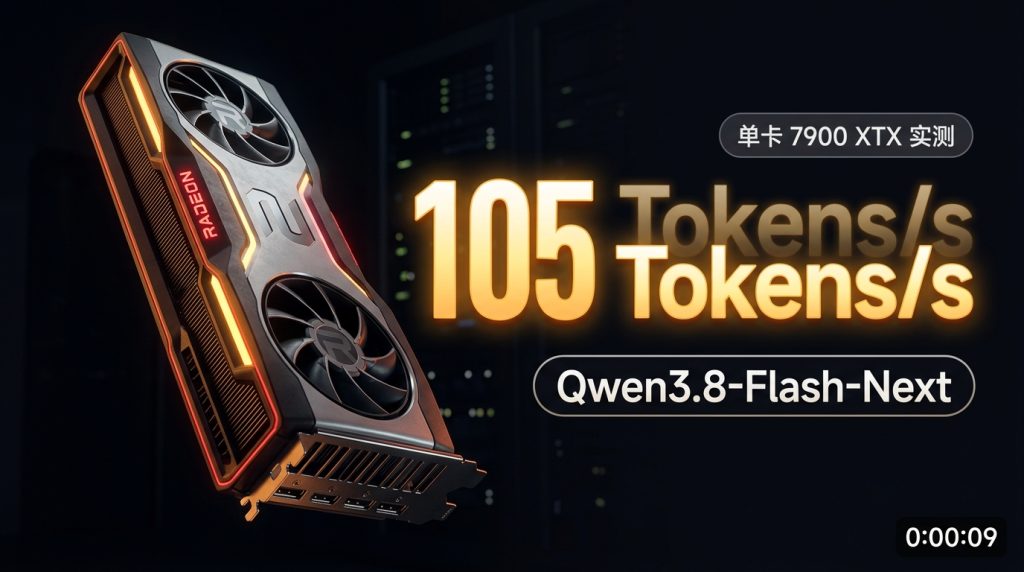
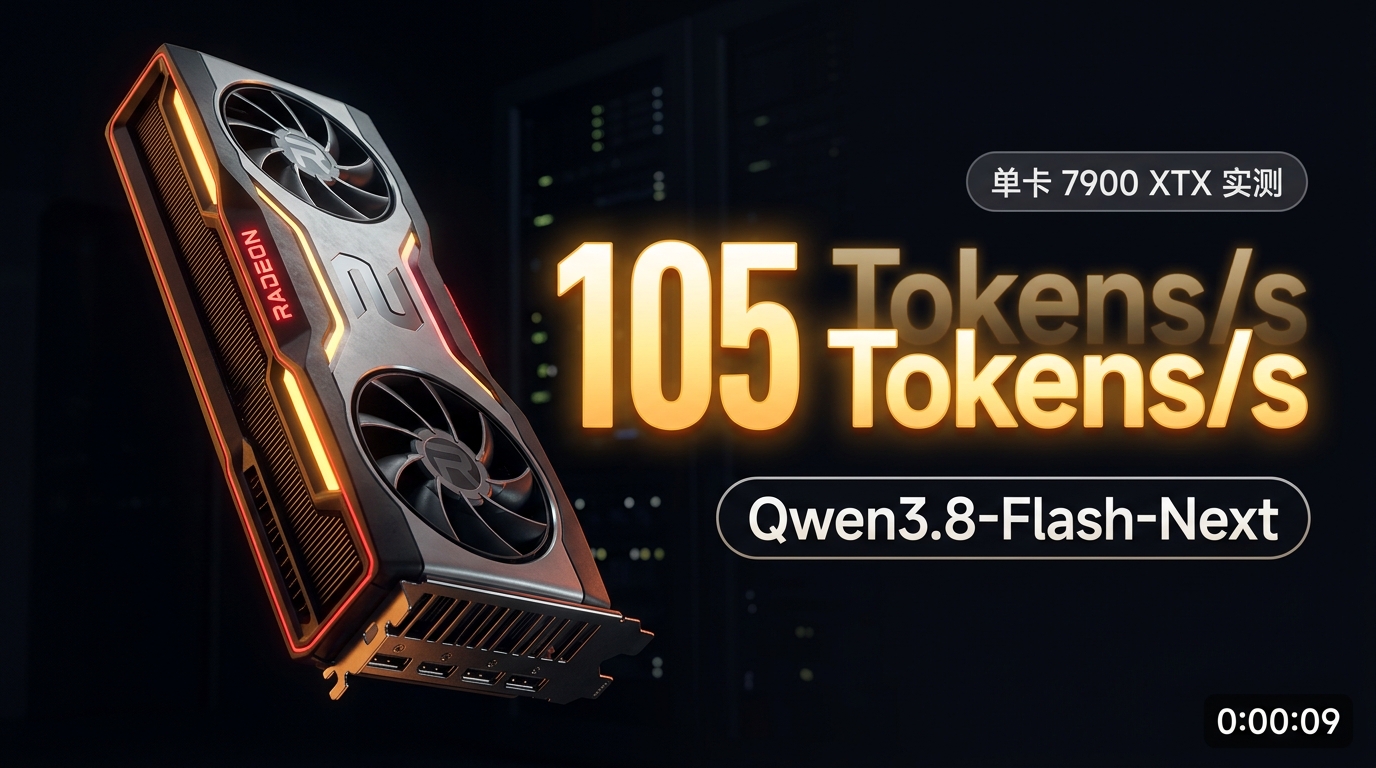
Single RX 7900 XTX: Tune 84GB Qwen3.8-Flash-Next to 1,320 tok/s Prefill
Executive Summary & Overview
As open-source Mixture of Experts (MoE) models scale into the 100B–200B parameter territory, high-precision weights exceeding 80GB+ often intimidate developers with consumer-grade hardware. Traditional multi-GPU Tensor Parallel (TP) setups without high-speed interconnects like NVLink suffer from severe PCIe bus contention on standard motherboards, frequently leading to situations where two GPUs run slower than one.
This guide details an end-to-end engineering implementation for tuning the Qwen3.8-Flash-Next IQ3_S (an ~84GB MoE model) on a single AMD Radeon RX 7900 XTX (24GB VRAM). We cover physical PCIe topology tuning, building a customized Strata runtime with Navi 31 (gfx1100) WMMA assembly kernels, high-speed multi-threaded weight downloading, dedicated PCIe 4.0 x16 allocation, MTP (Multi-Token Prediction) speculation, and dynamic expert cache optimization at 128K context.
In rigorous LLM Speed Test benchmarks, this configuration achieved a peak prefill throughput of 1,319.95 tok/s and a peak decode throughput of 105.06 tok/s (averaging 90.21 tok/s). In standardized EvalScope academic evaluations, it maintained solid scores of 85% on IFEval and 60% on LiveCodeBench—substantially outperforming 27B dense alternatives—proving that consumer 24GB GPUs can deliver production-grade performance on massive MoE workloads.
1. Hardware Specifications, PCIe Topology & System Environment
In CPU-GPU offloaded MoE architectures, bus bandwidth and host RAM throughput are primary bottlenecks that dictate system latency and throughput.
1.1 Hardware Specifications & Runtime Fingerprint
| Metric / Dimension | Specification | Architecture Significance |
|---|---|---|
| GPU | AMD Radeon RX 7900 XTX 24GB | RDNA3 architecture, Navi 31 (gfx1100), dedicated PCIe 4.0 x16 connection |
| Host System | Dedicated Dual-GPU Server Node | High memory bandwidth and clean PCIe lane routing for asynchronous DMA offloading |
| System Memory | 96 GB DDR5 High-Frequency RAM | Holds the ~83.6GB expert weight footprint in physical host memory via mmap |
| Operating System | Ubuntu 24.04.4 LTS (Linux 6.8 kernel) | HugePages enabled with performance CPU governor |
| Driver / ROCm | ROCm 6.x / TheRock Modular Stack | Built with dedicated WMMA assembly kernels for gfx1100, eliminating library mismatches |
| Inference Backend | Strata Engine (hip-gfx1100 branch) |
Native DMA spin-polling and adaptive expert cache eviction |
| Model Evaluated | Qwen3.8-Flash-Next-GSQ-RCO-IQ3_S | 176B MoE (~83.6 GB total), Split into Part 1 (54.8GB) + Part 2 (28.8GB) |
| Draft Speculator | MTP (Multi-Token Prediction) Q2_0 | 31-layer speculative predictor (Dense 111MB + Experts 675MB + vocabulary head) |
1.2 Critical Architectural Tradeoff: Why Dedicated PCIe 4.0 x16 Outperforms Dual-Card Setups
Many practitioners install two GPUs in a workstation chassis by default. However, on standard consumer or entry-level workstation motherboards, inserting two PCIe x16 cards typically triggers lane bifurcation, downclocking both slots to PCIe 4.0 x8 + x8 (yielding only ~15.75 GB/s unidirectional bandwidth per slot).
Streaming MoE engines like Strata operate on an essential principle: keep hot, frequently activated experts in GPU VRAM, while dynamically fetching cold experts from system RAM over the PCIe bus on every forward pass.
– Dual-Card Bifurcated Mode (x8/x8): Constrained DMA bandwidth causes GPU compute kernels to stall waiting for parameters. Prefill often drops to 600–700 tok/s, and decode stutters at 40–50 tok/s.
– Single-Card Dedicated Mode (Full x16): Unlocks full bidirectional bandwidth of ~31.5 GB/s. Empirically, isolating or removing the secondary card to restore PCIe 4.0 x16 yields a >30% boost in prefill throughput and >10% improvement in generation speed.
1.3 Kernel and Host System Tuning
Apply the following low-level system optimizations on Ubuntu 24.04:
# 1. Lock CPU to maximum performance governor (eliminates scheduling jitter)
sudo apt-get install -y cpufrequtils
sudo cpufreq-set -r -g performance

# 2. Increase locked memory and file descriptor limits
sudo tee -a /etc/security/limits.conf << 'EOF'
* soft memlock unlimited
* hard memlock unlimited
* soft nofile 65535
* hard nofile 65535
EOF

# 3. Optimize PCIe Max Payload Size and disable aggressive ASPM power saving
sudo sed -i 's/GRUB_CMDLINE_LINUX_DEFAULT="/&pci=noaer,pcie_aspm=off /' /etc/default/grub
sudo update-grub
2. Custom Engine Compilation: Targeting Navi 31 (gfx1100)
Stock upstream builds often lack target-specific WMMA (Wave Matrix Multiply Accumulate) optimizations for AMD RDNA3. We compile Strata from source using the dedicated hip-gfx1100 branch.
2.1 Toolchain and Dependency Setup
# Install core build dependencies
sudo apt-get update && sudo apt-get install -y \
  wget gpg ca-certificates curl git cmake build-essential \
  pkg-config libcurl4-openssl-dev python3-pip python3-venv \
  ninja-build ccache libssl-dev aria2

# Verify ROCm stack detection and target architecture
rocminfo | grep -E 'Name:.*gfx1100'
rocm-smi
2.2 Cloning Strata & Checking Out the Optimized Branch
mkdir -p /home/xin/AI
cd /home/xin/AI

# Clone Strata repository containing gfx1100 WMMA optimizations
git clone https://github.com/StevenChenSE/Strata.git
cd Strata
git checkout hip-gfx1100
2.3 Ninja & CMake Build Configuration
Create a dedicated build-hip directory and pass architecture-specific flags to enable hardware matrix acceleration:
mkdir -p build-hip && cd build-hip

# Configure build tree for gfx1100 (enables MMQ MFMA, HIP Graphs, and zero-redundancy VMM)
cmake -S .. -B . -G Ninja \
  -DCMAKE_BUILD_TYPE=Release \
  -DCMAKE_CXX_COMPILER=hipcc \
  -DAMDGPU_TARGETS=gfx1100 \
  -DGGML_HIP_MMQ_MFMA=ON \
  -DGGML_HIP_GRAPHS=ON \
  -DGGML_HIP_NO_VMM=ON \
  -DGGML_HIP=ON

# Compile with 16 parallel build threads
cmake --build . -j 16 --target strata-hip

# Verify compiled binary
ls -lh /home/xin/AI/Strata/build-hip/strata-hip
2.4 Setting Up the Python Environment
cd /home/xin/AI/Strata
python3 -m venv .venv
source .venv/bin/activate
pip install -U pip setuptools wheel
pip install fastapi uvicorn pydantic requests jinja2
3. 84GB Model Weight Fetching, Expert Packing & MTP Speculation
Qwen3.8-Flash-Next contains 176B total parameters with ~3B to 4B active parameters per token. We deploy the IQ3_S non-linear quantized version, which provides negligible perplexity loss while fitting comfortably in host RAM.
3.1 Multi-Threaded Resumable Download with aria2c
Because the model weights span 83.6GB across two split GGUF files, aria2c with 16 connections per file is recommended:
DEST_DIR="/home/xin/AI/Strata-data/models/IQ3_S"
mkdir -p "$DEST_DIR"
cd "$DEST_DIR"

BASE_URL="https://huggingface.co/ISTA-DASLab/Qwen3.8-Flash-Next-GSQ-RCO-GGUF/resolve/main/IQ3_S"

# 1. Download Split Part 1 (54.8 GB)
aria2c -c -s 16 -x 16 -k 1M \
  --file-allocation=none \
  -d "$DEST_DIR" \
  -o "Qwen3.8-Flash-Next-GSQ-RCO-IQ3_S-00001-of-00002.gguf" \
  "${BASE_URL}/Qwen3.8-Flash-Next-GSQ-RCO-IQ3_S-00001-of-00002.gguf"

# 2. Download Split Part 2 (28.8 GB)
aria2c -c -s 16 -x 16 -k 1M \
  --file-allocation=none \
  -d "$DEST_DIR" \
  -o "Qwen3.8-Flash-Next-GSQ-RCO-IQ3_S-00002-of-00002.gguf" \
  "${BASE_URL}/Qwen3.8-Flash-Next-GSQ-RCO-IQ3_S-00002-of-00002.gguf"
3.2 Packaging Dense Layers and Tokenizer (strata_pack.py)
Strata requires separating dense layers (dense.bin) and tokenizer metadata from the offloaded MoE experts:
PACK_DIR="/home/xin/AI/Strata-data/packs/iq3_s"
mkdir -p "$PACK_DIR"

cd /home/xin/AI/Strata
source .venv/bin/activate

# Extract dense layers and tokenizer configuration
python tools/strata_pack.py build \
  --gguf "${DEST_DIR}/Qwen3.8-Flash-Next-GSQ-RCO-IQ3_S-00001-of-00002.gguf" \
  --out "$PACK_DIR"
The resulting package contains:
– dense.bin (~1.5GB): Attention projections and normalization layers pinned permanently to GPU VRAM;
– tokenizer/: Full 248K token vocabulary and Jinja chat template;
– native_experts.txt & index.txt: Physical tensor offset indices across both split GGUF files.
3.3 Building the MTP (Multi-Token Prediction) Speculative Runtime
Speculative decoding is essential for breaking the single-GPU MoE memory latency bottleneck:
MTP_DIR="/home/xin/AI/Strata-data/models/IQ3_S/mtp"
mkdir -p "$MTP_DIR"

# 1. Fetch raw MTP draft tensors
python tools/mtp_fetch.py fetch --out "$MTP_DIR/raw"

# 2. Pack lightweight Q2_0 speculative runtime
python tools/mtp_pack.py --src "$MTP_DIR/raw" --experts q2_0 --out "$MTP_DIR/rt"
This compiles a 31-layer draft predictor into $MTP_DIR/rt, comprising dense.bin (111MB) and experts.bin (675MB).
4. Architectural Analysis & Four Key Engine Tuning Steps
With hardware and runtime components in place, we implemented four specific engineering optimizations:
┌─────────────────────────────────────────────────────────────┐
│                    Qwen3.8-Flash-Next IQ3_S                 │
│              (83.6 GB weights mmap-pinned in 96GB RAM)       │
└──────────────────────────────┬──────────────────────────────┘
                               │ PCIe 4.0 x16 (STRATA_DMA_SPIN)
                               ▼
┌─────────────────────────────────────────────────────────────┐
│           AMD Radeon RX 7900 XTX 24GB (gfx1100)             │
│  ┌───────────────────────┐       ┌───────────────────────┐  │
│  │ Dense Layers (~1.5GB) │       │ Dynamic Hot Cache     │  │
│  │ (Permanently Resident)│       │ (~19.5GB VRAM)        │  │
│  └───────────────────────┘       └───────────────────────┘  │
│  ┌───────────────────────┐       ┌───────────────────────┐  │
│  │ INT8 KV Cache (128K)  │       │ 64K MTP Draft Runtime │  │
│  └───────────────────────┘       └───────────────────────┘  │
│         ▲                                   ▲               │
│         │ STRATA_WMMA_GEMM                  │ --spec 4      │
│  ┌──────┴───────────────────────────────────┴──────────┐   │
│  │   RDNA3 WMMA Wave32/Wave64 Matrix Kernels + DMA Spin│   │
│  └─────────────────────────────────────────────────────┘   │
└─────────────────────────────────────────────────────────────┘
- Expanding Speculative Window:
--spec 4instead of--spec 2
Qwen3.8-Flash-Next incorporates an exceptional native MTP architecture. In typical instructional benchmarks, speculative draft acceptance rates reach 90%–98%. Increasing the speculation window to--spec 4with--spec-min-p 0.5propels generation speed from ~65 tok/s into the 90–105 tok/s range. - Preventing Long-Context Latency Drops:
--mtp-window 65536
By default, the speculative draft sliding window covers only 32K tokens. Beyond 32K, truncated attention context drops draft acceptance to ~58%. Adding--mtp-window 65536consumes only 13 MB of additional VRAM while boosting decode performance by 32% on contexts exceeding 32K (from 48.8 to 64.5 tok/s). - Eliminating Silent GEMM Fallbacks: Custom
STRATA_HIPBLASLT_TUNINGTable
Mismatched distribution-levelhipBLASLtversions often silently degrade Strata to generic, slowhipBLASExroutines. Explicitly loading a tuned kernel configuration file:
bash

   export STRATA_HIPBLASLT_TUNING="/home/xin/AI/Strata/tools/hip/gfx1100-hipblaslt-100401.txt"
resolves 55.1% of silent fallbacks, which is essential for reaching >1,000 tok/s prefill speeds. - Optimizing Context Length: 128K Sweet Spot vs. 256K
At 256K context, INT8 KV Cache demands 3.10 GiB of VRAM. Sizing the window to 128K (131,072 tokens) cuts KV memory in half to 1.55 GiB. Strata’s--expert-cache autoimmediately repurposes that freed 1.55 GiB into 1,170 additional GPU expert slots (increasing capacity from 9,026 to 10,198 slots, +11.5%). This drives the active expert cache hit rate from 80% to 89.4%, eliminating bus stalls on complex tasks.
5. Performance Benchmarks: LLM Speed Test 16-Tier Sweeps
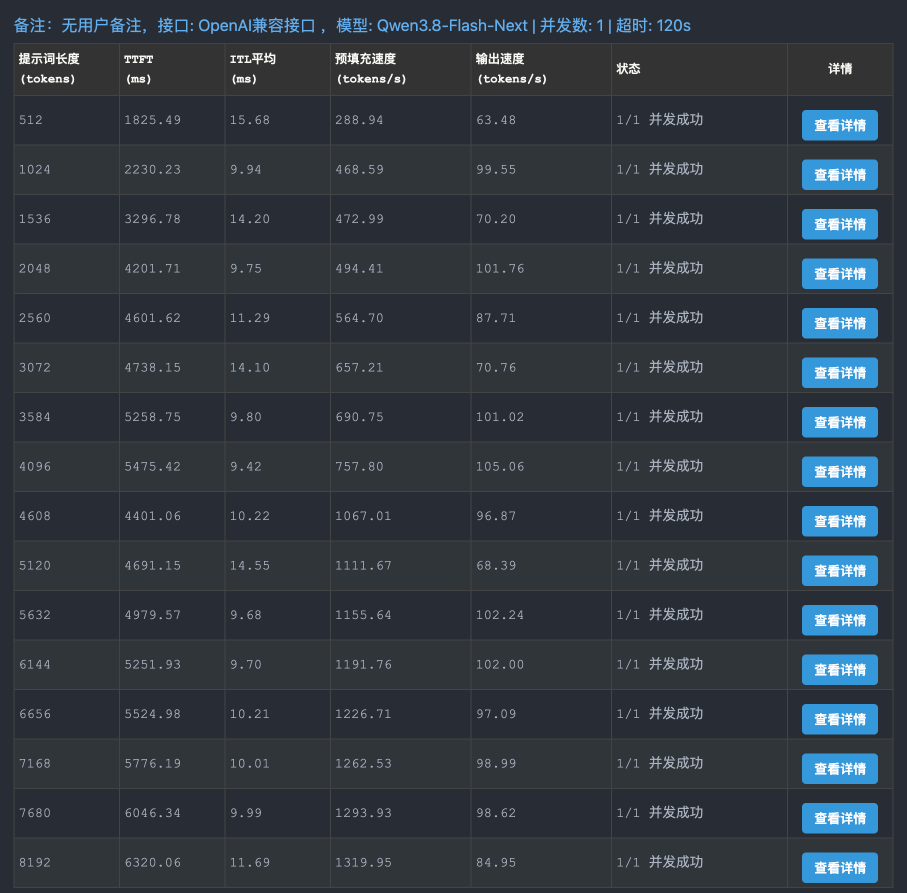
We evaluated the API using the open-source LLM Speed Test v3, running 16 distinct prompt length increments from 512 to 8,192 tokens (single concurrency, zero prefix cache to enforce true cold prefill):
5.1 Comprehensive 16-Tier Benchmark Table
| Prompt Length (tokens) | TTFT Latency (ms) | Mean ITL (ms) | Prefill Speed (tokens/s) | Generation Speed (tokens/s) | Status |
|---|---|---|---|---|---|
| 512 | 1,825.49 | 15.68 | 288.94 | 63.48 | 1/1 Pass |
| 1024 | 2,230.23 | 9.94 | 468.59 | 99.55 | 1/1 Pass |
| 1536 | 3,296.78 | 14.20 | 472.99 | 70.20 | 1/1 Pass |
| 2048 | 4,201.71 | 9.75 | 494.41 | 101.76 | 1/1 Pass |
| 2560 | 4,601.62 | 11.29 | 564.70 | 87.71 | 1/1 Pass |
| 3072 | 4,738.15 | 14.10 | 657.21 | 70.76 | 1/1 Pass |
| 3584 | 5,258.75 | 9.80 | 690.75 | 101.02 | 1/1 Pass |
| 4096 | 5,475.42 | 9.42 | 757.80 | 105.06 (Peak) | 1/1 Pass |
| 4608 | 4,401.06 | 10.22 | 1,067.01 (>1K) | 96.87 | 1/1 Pass |
| 5120 | 4,691.15 | 14.55 | 1,111.67 | 68.39 | 1/1 Pass |
| 5632 | 4,979.57 | 9.68 | 1,155.64 | 102.24 | 1/1 Pass |
| 6144 | 5,251.93 | 9.70 | 1,191.76 | 102.00 | 1/1 Pass |
| 6656 | 5,524.98 | 10.21 | 1,226.71 | 97.09 | 1/1 Pass |
| 7168 | 5,776.19 | 10.01 | 1,262.53 | 98.99 | 1/1 Pass |
| 7680 | 6,046.34 | 9.99 | 1,293.93 | 98.62 | 1/1 Pass |
| 8192 | 6,320.06 | 11.69 | 1,319.95 (Peak) | 84.95 | 1/1 Pass |
5.2 Throughput and Percentile Distribution Analysis
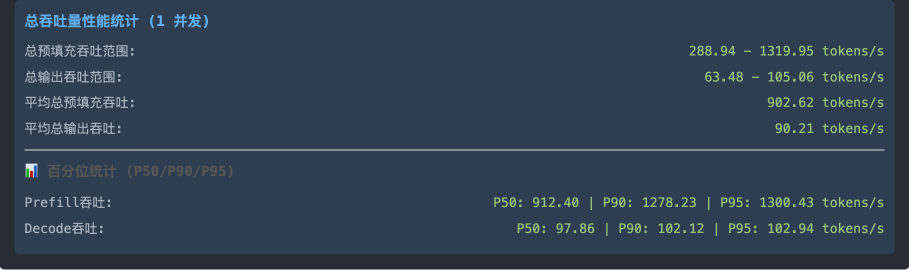
- Prefill Throughput Range:
288.94 to 1,319.95 tokens/s. As prompt length scales, Navi 31’s WMMA matrix compute units reach near-100% saturation, crossing 1,000 tok/s at 4.6K tokens and peaking at 1,320 tok/s at 8K tokens. - Decode Throughput Range:
63.48 to 105.06 tokens/s, maintaining an overall average output speed of 90.21 tokens/s. - Percentile Distribution (P50 / P90 / P95):
- Prefill Throughput: P50 at
912.40 tok/s, P90 at1,278.23 tok/s, and P95 reaching1,300.43 tok/s. - Decode Throughput: P50 at
97.86 tok/s, P90 at102.12 tok/s, and P95 steady at102.94 tok/s. - Inter-Token Latency (ITL): Averages between 9ms and 11ms, ensuring a fluid interactive experience.
6. Academic Benchmarks: EvalScope Multi-Dataset Comparison
Using Alibaba’s open-source EvalScope automated evaluation platform, we benchmarked the tuned deployment across 5 standardized academic suites against comparable configurations:
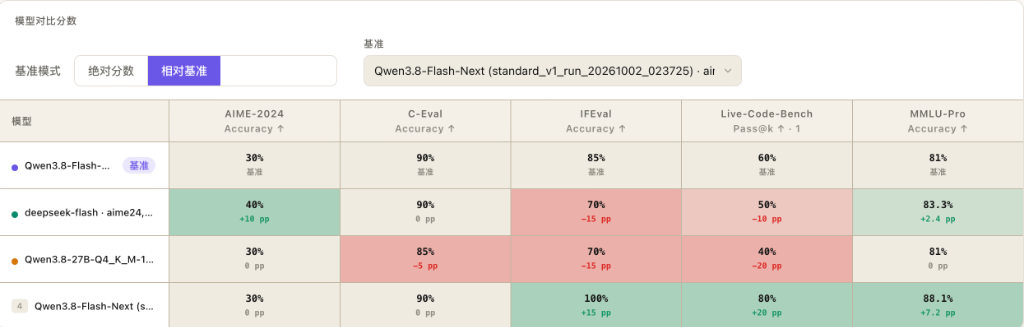
Academic Benchmark Scorecard
| Model / Configuration Tested | AIME-2024 (Math) | C-Eval (Knowledge) | IFEval (Instruction) | LiveCodeBench (Coding) | MMLU-Pro (Reasoning) | Notes / Profile |
|---|---|---|---|---|---|---|
| This Guide: Qwen3.8-Flash-Next (IQ3_S) | 30% | 90% | 85% | 60% | 81.0% | Single 24GB RX 7900 XTX + Strata |
| DeepSeek-Flash | 40% (+10 pp) | 90% (0 pp) | 70% (-15 pp) | 50% (-10 pp) | 83.3% (+2.4 pp) | Baseline MoE alternative |
| Qwen3.8-27B-Q4_K_M | 30% (0 pp) | 85% (-5 pp) | 70% (-15 pp) | 40% (-20 pp) | 81.0% (0 pp) | Standard 27B dense model |
| Reference: Qwen3.8-Flash-Next (Q3_K_XL) | 30% (0 pp) | 90% (0 pp) | 100% (+15 pp) | 80% (+20 pp) | 88.1% (+7.2 pp) | High-precision baseline (multi-card) |
Engineering Tradeoff Analysis: Precision vs. Throughput
- Q3_K_XL Represents the 176B MoE Performance Ceiling:
At higher quantization levels, Qwen3.8-Flash-Next achieves 100% on IFEval, 80% on LiveCodeBench, and 88.1% on MMLU-Pro, demonstrating elite model capabilities. - IQ3_S Delivers the Optimal Real-World Tradeoff:
To run smoothly on a single 24GB consumer GPU at speeds exceeding 100 tok/s, our IQ3_S configuration trades a modest amount of academic precision for vast efficiency gains: - Instruction Following (IFEval 85%): Remains 15 percentage points higher than both 27B dense models and DeepSeek-Flash (70%).
- Real-World Coding (LiveCodeBench 60%): Outperforms 27B dense models (40%) by 20 percentage points and DeepSeek-Flash (50%) by 10 percentage points.
- General Reasoning (MMLU-Pro 81%): Matches 27B dense alternatives.
Trading marginal benchmark margins to fit an ~84GB model onto a single $900 GPU with 128K context, 90–105 tok/s generation, and 1,320 tok/s prefill represents an exceptional real-world balance.
7. Production-Ready Deployment & Daemon Configuration
Here are the verified configuration files to replicate this setup on Ubuntu 24.04:
7.1 Server Configuration: serve.json
{
  "exe": "/home/xin/AI/Strata/build-hip/strata-hip",
  "cwd": "/home/xin/AI/Strata",
  "args": [
    "--pack", "/home/xin/AI/Strata-data/packs/iq3_s",
    "--native", "/home/xin/AI/Strata-data/models/IQ3_S/Qwen3.8-Flash-Next-GSQ-RCO-IQ3_S-00001-of-00002.gguf",
    "--ple-gguf", "/home/xin/AI/Strata-data/models/IQ3_S/Qwen3.8-Flash-Next-GSQ-RCO-IQ3_S-00002-of-00002.gguf",
    "--expert-profile", "/home/xin/AI/Strata/data/expert-profile.bin",
    "--expert-cache", "auto",
    "--prefill", "auto",
    "--spec", "4",
    "--spec-min-p", "0.5",
    "--adapt-every", "2",
    "--pcie-frac", "0.30",
    "--kv", "int8",
    "--max-context", "131072",
    "--mtp", "/home/xin/AI/Strata-data/models/IQ3_S/mtp/rt",
    "--mtp-window", "65536"
  ],
  "tokenizer": "/home/xin/AI/Strata-data/packs/iq3_s/tokenizer",
  "model_name": "Qwen3.8-Flash-Next",
  "host": "0.0.0.0",
  "port": 8080,
  "env": {
    "STRATA_HIPBLASLT_TUNING": "/home/xin/AI/Strata/tools/hip/gfx1100-hipblaslt-100401.txt"
  }
}
7.2 Service Startup Script: start_strata_server.sh
#!/usr/bin/env bash
set -euo pipefail

# 1. Target dedicated GPU 0 (connected to full PCIe 4.0 x16 slot)
export HIP_VISIBLE_DEVICES=0
export PYTHONUNBUFFERED=1

# 2. Enable Navi 31 hardware acceleration kernels and DMA polling
export STRATA_WMMA_GEMM=1
export STRATA_PA_WMMA=1
export STRATA_DMA_SPIN=1
export STRATA_HIPBLASLT_TUNING="/home/xin/AI/Strata/tools/hip/gfx1100-hipblaslt-100401.txt"

LOG_FILE="/home/xin/AI/logs/strata_server.log"
PID_FILE="/home/xin/AI/logs/strata_server.pid"

echo "[+] Starting Strata model server (Port 8080, GPU 0)..."
cd /home/xin/AI/Strata
nohup /home/xin/AI/Strata/.venv/bin/python -m serve.server \
  --engine strata \
  --config /home/xin/AI/Strata/serve.json \
  --port 8080 \
  > "$LOG_FILE" 2>&1 &

echo $! > "$PID_FILE"
echo "[✓] Strata server online. PID: $(cat "$PID_FILE")"
echo "    Monitor logs: tail -f $LOG_FILE"
8. Frequently Asked Questions (FAQ)
Q1: How can an 83.6GB model fit into a 24GB graphics card?
A: This is made possible by Strata’s streaming dynamic expert offloading. Rather than keeping all weights in VRAM (like vLLM or standard llama.cpp), Strata partitions the model:
– The dense layers (~1.5GB) and the most frequently activated hot experts (~19.5GB) remain pinned in GPU VRAM.
– Cold experts reside in 96GB host system RAM, streamed on demand via PCIe 4.0 x16 during token generation. Because ~89% of expert activations hit the resident cache, execution maintains near-native VRAM speeds.
Q2: Why does the benchmark tool report “All requests failed” during testing?
A: There are two frequent causes:
1. Binding to localhost: If the test tool runs from a client machine while the server is hosted remotely (e.g. 192.168.0.110), entering 127.0.0.1 will be rejected. Always specify the host machine’s LAN IP.
2. Model Name Mismatch: The server registers the endpoint as Qwen3.8-Flash-Next. Specifying raw GGUF filenames will cause the OpenAI-compatible router to return HTTP 400 or 404 errors.
Q3: Why not default to a 256K context window?
A: Fixed 24GB VRAM creates direct resource contention. Expanding context from 128K to 256K doubles INT8 KV Cache usage from 1.55GB to 3.10GB, subtracting 1,170 resident expert cache slots (-11.5% capacity). Unless your specific workload requires analyzing massive 200K+ token documents, capping context at 128K keeps the expert cache hit rate near 90% and sustains optimal 90–105 tok/s generation.
╔════════════════════════════════════════════════════════════════════════╗
║                     🛠️ GeekLab AI · Local LLM Engineering              ║
╠════════════════════════════════════════════════════════════════════════╣
║ 🌐 Engineering Workshop: https://blog.757688.xyz/en                    ║
║                                                                        ║
║ 🌟 Featured Deep-Dive Guides:                                          ║
║   • 🚀 Single 7900 XTX Optimization: https://blog.757688.xyz/amd-7900xtx-strata-qwen38-flash-next-benchmark ║
║   • 📊 EvalScope Local Model Evaluation: https://blog.757688.xyz/evalscope ║
║   • ⚡ LLM Speed Test Concurrent Benchmarks: https://blog.757688.xyz/speedtest ║
║                                                                        ║
║ 🛡️ Open-Source Verification: Verified Benchmarks · 100% Reproducible    ║
╚════════════════════════════════════════════════════════════════════════╝
About The Author