Deploy Qwen 3.8 27B on AMD Radeon RX 7900 XTX: Squeezing 53 TPS with 262K Context & KV Cache Q4
Author: Chen Yang (玩客)
Categories: Local AI · AI Benchmarks
Tags:Qwen3.827BRX 7900 XTXllama.cppLocal LLMMTP Speculative DecodingKV Cache QuantizationROCm
🌟 Introduction: Running a 27B Dense LLM at 53 TPS Locally
Alibaba officially open-sourced Qwen 3.8 27B! As a 27-billion parameter, 64-layer native dense multimodal model, it natively supports an ultra-long context window of 262,144 tokens (262K), which can be extended up to 1 million tokens via YaRN interpolation.
After sharing benchmark results in the local LLM community, many developers asked:
– “Why can your local 27B model reach 50+ TPS, while mine only outputs around 15–20 TPS?”
– “How do you configure the AMD Radeon RX 7900 XTX 24GB VRAM to handle long contexts without triggering Out-Of-Memory (OOM) crashes?”
– “How should we choose between Q4, Q3, and Q2 quantizations, and what is the actual accuracy degradation?”
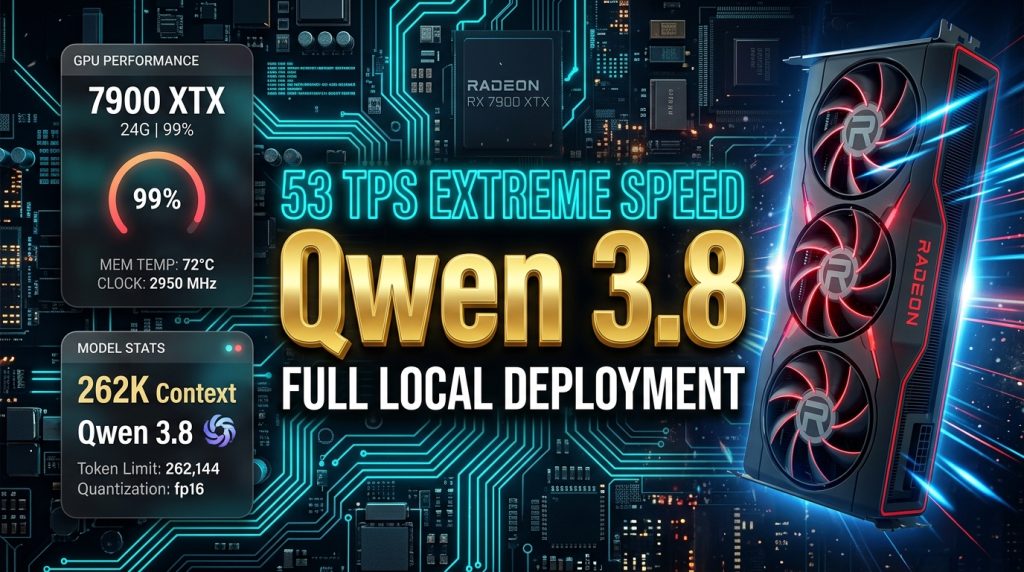
This in-depth guide covers the three essential acceleration techniques (262K Context + KV Cache Q4 Quantization + MTP Speculative Decoding) that squeeze 24GB VRAM to 23.90 GB (99.5% utilization), delivering peaks of 53 TPS and a sustained average of 47 TPS, complete with ready-to-run startup scripts and benchmark prompts.
💻 1. Hardware Setup & VRAM Utilization
The benchmark was conducted on a high-value workstation pairing an accessible CPU with a 24GB flagship GPU:
- CPU: AMD Ryzen 3700X
- System Memory (RAM): 32GB DDR4
- GPU: AMD Radeon RX 7900 XTX (24GB GDDR6 VRAM)
- Inference Runtime: llama.cpp (ROCm / Vulkan / CUDA 13 builds)
📊 Benchmark Metrics
- Actual VRAM Usage:
23.90 GB / 24.00 GB(99.5% saturation — fully utilizing the hardware) - Inference Throughput (TPS):
- Peak Output: 52 ~ 53 Tokens/sec
- Sustained Long-Context Speed: 47 Tokens/sec
- Time to First Token (TTFT): Under 0.3 seconds for instantaneous response.
⚡ 2. The 3 Acceleration Pillars: Tuning llama.cpp for Max Throughput
To maximize inference speed and unlock massive context lengths on consumer hardware, you need to combine three key arguments in llama-server:
graph LR
    A[Qwen 3.8 27B Engine] --> B[262K Native Context Window]
    A --> C[KV Cache Q4 Quantization]
    A --> D[MTP Speculative Decoding]
    B --> E[Full Codebases & 100K+ Doc Ingestion]
    C --> F[Saves 75% KV VRAM, Prevents OOM]
    D --> G[Boosts Throughput up to 53 Tokens/s]
1. 262K Native Context Window (-c 262144)
Qwen 3.8 natively supports 262,144 tokens. You can ingest an entire Git repository, a complete technical book, or hundreds of pages of financial reports in a single prompt—eliminating information loss from standard RAG chunking.
2. KV Cache Q4 Quantization (--cache-type-k q4_0 --cache-type-v q4_0)
Standard FP16 KV cache consumes enormous amounts of memory. As context approaches 32K or 64K tokens, the cache alone can exceed 10–15 GB, causing immediate OOM.
Enabling q4_0 precision cuts KV memory footprint by up to 75% with negligible perplexity impact, allowing a single 24GB card to comfortably host ultra-long dialogues.
3. MTP Speculative Decoding (--spec-type draft-mtp / --draft-max 4)
Multi-Token Prediction (MTP) leverages dedicated prediction heads during forward passes to predict the next 2–4 tokens simultaneously. In code generation and structured text, the speculation acceptance rate hits 70%–85%. This is the single biggest factor pushing throughput from 25 TPS straight up to 53 TPS.
🎯 3. Quantization Tier Guide: Precision vs. Memory Footprint
Choosing the right GGUF quantization level is critical. Here is a real-world breakdown:
| Quant Format | File Size | Accuracy Loss | Rating | Recommended Hardware & Scenario |
|---|---|---|---|---|
| Q5_K_M | ~19.8 GB | < 1% (Nearly Lossless) | ⭐⭐⭐⭐ | 24GB cards for maximum output quality; imperceptible difference from 16-bit. |
| Q4_K_M | ~17.1 GB | 2% ~ 5% | ⭐⭐⭐⭐⭐ | [The Sweet Spot · Recommended] Perfect balance between speed, VRAM, and logical rigor. |
| Q3_K_M | ~13.8 GB | 8% ~ 15% | ⭐⭐⭐ | Viable compromise for 16GB cards (e.g., RTX 4080 / 4060 Ti 16GB). |
| Q2_K | ~10.7 GB | 30% ~ 50% | ❌ Avoid | Severe damage to attention mechanisms and reasoning; not suitable for production. |
💡 Recommendation: Choose
Q4_K_M. For 24GB GPUs (AMD RX 7900 XTX, RTX 3090, RTX 4090), Q4_K_M allows full offloading while leaving enough room for the KV cache.
📥 4. Model Weights & Official Resources
Download the official model weights and runtime builds directly from the following repositories:
- Hugging Face Official GGUF Repository: https://huggingface.co/unsloth/Qwen3.8-27B-GGUF/tree/main
- ModelScope Mirror: https://www.modelscope.cn/models/unsloth/Qwen3.8-27B-GGUF/files
- llama.cpp Official GitHub Releases: https://github.com/ggml-org/llama.cpp/releases
Required files:
1. Primary Weights: Qwen3.8-27B-Q4_K_M.gguf (~17.1 GB)
2. Multimodal Vision Projector: mmproj-F16.gguf (~884 MB)
🚀 5. Step-by-Step Local Deployment Guide
Step 1: Set Up the llama.cpp Runtime
- AMD Radeon Users (RX 7000 / 6000 Series): Download ROCm-enabled or Vulkan-enabled pre-built binaries. On Linux, ensure ROCm 6.x is installed.
- NVIDIA Users (RTX 30 / 40 / 50 Series): Download the
llama-bxxxx-bin-win-cuda-13.x-x64.ziprelease along with CUDA dependencies. - macOS Users: Install via Homebrew (
brew install llama.cpp) or compile with Metal acceleration.
Step 2: Organize Files
Create a models/ directory in your llama.cpp folder and place the downloaded files inside:
llama.cpp/
├── llama-server.exe (or llama-server on Linux/macOS)
└── models/
    ├── Qwen3.8-27B-Q4_K_M.gguf
    └── mmproj-F16.gguf
Step 3: Create the Startup Script
Windows (launch-7900xtx.bat)
@echo off
title Qwen 3.8 27B Server - RX 7900 XTX 24GB (53 TPS)
color 0B

echo =====================================================================
echo    Launching Qwen 3.8 27B Native Dense Model with llama.cpp
echo =====================================================================
echo.

llama-server.exe ^
  --model models\Qwen3.8-27B-Q4_K_M.gguf ^
  --mmproj models\mmproj-F16.gguf ^
  -ngl 99 ^
  -c 262144 ^
  --cache-type-k q4_0 ^
  --cache-type-v q4_0 ^
  -fa on ^
  -np 1 ^
  -t 8 -tb 16 ^
  --reasoning off ^
  --spec-type draft-mtp ^
  --host 0.0.0.0 --port 8080

pause
Linux / macOS (launch-7900xtx.sh)
#!/usr/bin/env bash
./llama-server \
  --model models/Qwen3.8-27B-Q4_K_M.gguf \
  --mmproj models/mmproj-F16.gguf \
  -ngl 99 \
  -c 262144 \
  --cache-type-k q4_0 \
  --cache-type-v q4_0 \
  -fa on \
  -np 1 \
  -t 8 -tb 16 \
  --reasoning off \
  --spec-type draft-mtp \
  --host 0.0.0.0 --port 8080
Step 4: Launch and Access the Web UI
Run the startup script and navigate to:
👉 http://127.0.0.1:8080
You will be greeted by the built-in llama.cpp web console featuring multi-turn chat, multimodal image drag-and-drop, and high-speed streaming code generation.
🔬 6. Stress Test: Zero-Shot Single-File Cyberpunk App
To verify sustained 53 TPS generation quality, we challenged Qwen 3.8 27B with this complex prompt:
Build a complete, single-file HTML/CSS/JS application: "Neon Particle Gravity Sandbox".

Technical & Visual Requirements:
1. Vanilla Only: Everything in a single self-contained HTML file without any external CDNs, libraries, or images.
2. Aesthetic: Dark background (#08080c) with 1,200 glowing neon particles (cyan, purple, magenta).
3. Physics Engine:
   - Real velocity vectors, drag damping, and elastic boundary collisions.
   - Mouse click/drag generates a gravitational black hole with spiral vortices.
   - Right-click toggles a repulsive force field.
   - Spacebar triggers a full-screen supernova explosion with particle shockwaves.
4. HUD Overlay: Real-time 60 FPS counter, particle count, and current gravity mode displayed top-left.

Output ONLY executable HTML/CSS/JS code. No conversational fluff.
🚀 Test Results
Under the 27B dense weights and 262K context configuration, the model planned, implemented, and self-checked 300+ lines of clean vanilla JavaScript physics code in ~3 minutes, streaming continuously at 47–53 TPS.
Opening the resulting .html file delivered a steady 60 FPS animation with fluid gravitational physics and impressive visual fidelity.
💬 Discussion & Community Benchmarks
What GPU setup are you running for local LLMs? Have you tested Qwen 3.8 27B with MTP and KV Cache quantization yet?
Drop your hardware specs, driver versions, and benchmark results in the comments below!
About The Author